> ## Documentation Index
> Fetch the complete documentation index at: https://docs.gurubase.ai/llms.txt
> Use this file to discover all available pages before exploring further.
# Actions
> Extend your Guru's capabilities with external API calls and tool integrations
Actions transform your Guru from a static knowledge base into a **dynamic AI agent** that can execute code, call APIs, and fetch real-time data. When users ask questions, your Guru automatically triggers relevant actions to provide live, accurate responses.
## What Can Actions Do?
Look up refunds, invoices, subscriptions, and charges in Stripe, billing systems, or ERPs
Pull account details, entitlements, and plan info from CRM or product databases
Check Statuspage, Datadog, or monitoring tools for outages and incidents
Track shipments, check stock levels, and query warehouse systems in real-time
Create bugs, update tickets, check SLAs, and manage queue hygiene
Connect to any system with an API — internal tools, third-party services, or custom endpoints
## Action Types
| Type | Description | Latency | Best For |
| --------------- | ------------------------------------------------------------ | ------------------ | --------------------------------------------------------------------- |
| **Python Code** | Execute custom Python scripts in isolated sandbox containers | 2-3 seconds | Complex logic, data processing, multi-step API calls, AI integrations |
| **API Call** | Make HTTP requests directly to external APIs | Very low (\~100ms) | Simple REST API lookups, single-endpoint queries |
Use **API Call** for simple lookups (faster response). Use **Python Code** when you need to process data, call multiple APIs, or add conditional logic.
## Scheduled Actions
Actions can run automatically on a schedule using cron expressions — no user question required.
| Use Case | Cron Expression | Description |
| ------------------- | --------------- | ------------------------ |
| Daily SLA report | `0 9 * * *` | Every day at 9 AM |
| Hourly status check | `0 * * * *` | Every hour |
| Weekly digest | `0 9 * * 1` | Every Monday at 9 AM |
| Every 15 minutes | `*/15 * * * *` | For real-time monitoring |
1. Open the action editor
2. Scroll to **Schedule Configuration**
3. Toggle **Enable Scheduling**
4. Enter a cron expression (e.g., `0 9 * * *` for daily at 9 AM)
The action will run automatically at the scheduled time. Results are logged in the action history.
**Common scheduled action patterns:**
* **Morning SLA briefing** — Check at-risk tickets before the team starts
* **Incident monitoring** — Poll status pages every 15 minutes
* **Usage alerts** — Daily check for customers approaching limits
* **Data sync** — Periodically update external systems
## High-Impact Actions for Common Pain Points
**Customer asks:** *"I requested a refund 3 days ago but still haven't received it. Order #12345. What's going on?"*
* Open Stripe dashboard
* Search for customer email
* Copy transaction ID
* Check subscription status in another tab
* Cross-reference with CRM
* Type "let me check and get back to you"
* **5+ minutes per ticket**
* Agent asks Guru: *"Check refund for order 12345"*
* Action fetches data from Stripe automatically
* AI responds with status, ETA, and next steps
* **Done in seconds**
### For Support Agents
**Pain:** Billing questions are high-volume. Agents waste time hopping between Stripe, ERP, CRM, and email threads just to answer "where is my refund?"
**User asks:** *"Where is my refund for order 12345?"* or *"Can you resend the invoice for December?"*
**Integrations:** Stripe, Billing/ERP, CRM
**Result:** Refund state + ETA + invoice link + next step (if failed)
**Impact:** Reduces billing tickets 40%+, eliminates "let me check and get back to you"
***
**Trigger:** "When the user asks about a refund status, invoice, or payment"
**Parameters:**
| Name | Type | What to Extract | Required |
| ---------------- | ------ | ------------------------ | -------- |
| `order_id` | String | Order or invoice number | Yes |
| `customer_email` | String | Customer's email address | No |
**Secrets:** `STRIPE_API_KEY`
```python theme={null}
import os
import requests
order_id = os.environ.get('order_id')
api_key = os.environ.get('STRIPE_API_KEY')
# Search for refunds related to this order
response = requests.get(
"https://api.stripe.com/v1/refunds",
auth=(api_key, ''),
params={"limit": 10}
)
refunds = response.json().get('data', [])
found = None
for r in refunds:
if order_id in str(r.get('metadata', {})) or order_id in r.get('id', ''):
found = r
break
if found:
status = found['status']
amount = found['amount'] / 100
currency = found['currency'].upper()
print(f"💰 Refund Status: {status.upper()}")
print(f"💵 Amount: {amount} {currency}")
if status == 'succeeded':
print(f"✓ Refund completed - funds returned to original payment method")
print(f"⏱️ May take 5-10 business days to appear on statement")
elif status == 'pending':
print(f"⏳ Refund is processing - typically completes within 5-10 business days")
else:
print(f"⚠️ Refund status: {status} - may require manual review")
else:
print(f"No refund found for order {order_id}")
print(f"💡 Next step: Check if refund was requested or process new refund")
```
**Pain:** "I was charged twice!" claims escalate fast. Agents need exact transaction mapping to prevent unnecessary refunds.
**User asks:** *"I see two charges of \$49.99. What happened?"*
**Integrations:** Payment provider, Subscription ledger
**Result:** Charge IDs, whether one is auth/hold, whether it was reversed, recommended response
**Impact:** Prevents unnecessary refunds, reduces escalations, improves customer trust
***
**Trigger:** "When the user reports duplicate charges, double billing, or being charged twice"
**Parameters:**
| Name | Type | What to Extract | Required |
| ---------------- | ------ | ----------------------------- | -------- |
| `customer_email` | String | Customer's email address | Yes |
| `amount` | Number | The charge amount in question | No |
**Secrets:** `STRIPE_API_KEY`
```python theme={null}
import os
import requests
from datetime import datetime, timedelta
email = os.environ.get('customer_email')
amount = os.environ.get('amount')
api_key = os.environ.get('STRIPE_API_KEY')
# Get recent charges for this customer
response = requests.get(
"https://api.stripe.com/v1/charges",
auth=(api_key, ''),
params={"limit": 20}
)
charges = response.json().get('data', [])
recent = [c for c in charges if email in str(c.get('billing_details', {}).get('email', ''))]
if len(recent) >= 2:
print(f"📋 Found {len(recent)} recent charges for {email}:\n")
for c in recent[:5]:
amt = c['amount'] / 100
status = c['status']
captured = "Captured" if c['captured'] else "Auth Hold (not captured)"
refunded = " [REFUNDED]" if c['refunded'] else ""
date = datetime.fromtimestamp(c['created']).strftime('%Y-%m-%d %H:%M')
print(f" • ${amt} - {status} - {captured}{refunded}")
print(f" ID: {c['id'][:20]}... | Date: {date}\n")
# Check for auth holds
auth_holds = [c for c in recent if not c['captured']]
if auth_holds:
print(f"💡 {len(auth_holds)} charge(s) are authorization holds that will auto-release in 7 days")
refunded = [c for c in recent if c['refunded']]
if refunded:
print(f"✓ {len(refunded)} charge(s) already refunded")
else:
print(f"Only {len(recent)} charge(s) found for {email} - no duplicate detected")
```
**Pain:** During outages, agents guess and customers get conflicting answers. Tickets pile up with the same question.
**User asks:** *"Your app is down!"* or *"502 error - is this known?"*
**Integrations:** Statuspage, Datadog/New Relic, Incident channel
**Result:** Current incident status, impacted regions/features, workaround, ETA, subscribe link
**Impact:** Deflects 80%+ of duplicate incident tickets, standardizes incident communication
***
**Trigger:** "When the user reports an error, outage, downtime, or asks if there's a known issue"
**Parameters:**
| Name | Type | What to Extract | Required |
| ------------ | ------ | ------------------------------------------ | -------- |
| `error_code` | String | Error code or message (e.g., 502, timeout) | No |
| `feature` | String | Feature or service affected | No |
**Secrets:** `STATUSPAGE_API_KEY`, `STATUSPAGE_PAGE_ID`
```python theme={null}
import os
import requests
api_key = os.environ.get('STATUSPAGE_API_KEY')
page_id = os.environ.get('STATUSPAGE_PAGE_ID')
error_code = os.environ.get('error_code', '')
feature = os.environ.get('feature', '')
# Get current incidents
response = requests.get(
f"https://api.statuspage.io/v1/pages/{page_id}/incidents/unresolved",
headers={"Authorization": f"OAuth {api_key}"}
)
incidents = response.json()
if incidents:
print(f"🚨 ACTIVE INCIDENT(S):\n")
for inc in incidents[:3]:
print(f"📌 {inc['name']}")
print(f" Status: {inc['status'].upper()}")
print(f" Impact: {inc['impact']}")
if inc.get('incident_updates'):
latest = inc['incident_updates'][0]
print(f" Latest update: {latest['body'][:200]}...")
print(f" 🔗 Track: {inc['shortlink']}\n")
print(f"💡 Recommended response: We're aware of an issue and actively working on it.")
print(f" Share the status link above for real-time updates.")
else:
print(f"✓ No active incidents on status page")
print(f"💡 This may be an isolated issue - gather more details:")
print(f" • Browser/device?")
print(f" • When did it start?")
print(f" • Can you share a screenshot?")
```
**Pain:** "Why can't I use feature X?" causes long back-and-forth. Agents ask "What plan are you on?" when they could just look it up.
**User asks:** *"Why can't I use SSO?"* or *"What's my seat limit?"*
**Integrations:** CRM, Product DB, Feature flags
**Result:** Plan, entitlements, usage limits, what to upgrade, exact remediation
**Impact:** Fewer escalations to Sales/Engineering, faster resolution
***
**Trigger:** "When the user asks about their plan, features, entitlements, limits, or why they can't access something"
**Parameters:**
| Name | Type | What to Extract | Required |
| ---------------- | ------ | ------------------------------ | -------- |
| `customer_email` | String | Customer's email or account ID | Yes |
| `feature` | String | Feature they're asking about | No |
**Secrets:** `PRODUCT_DB_API_KEY`
```python theme={null}
import os
import requests
email = os.environ.get('customer_email')
feature = os.environ.get('feature', '').lower()
api_key = os.environ.get('PRODUCT_DB_API_KEY')
# Mock product database lookup - replace with your actual API
response = requests.get(
f"https://api.yourproduct.com/v1/accounts/lookup",
headers={"Authorization": f"Bearer {api_key}"},
params={"email": email}
)
if response.status_code == 200:
data = response.json()
plan = data.get('plan', 'Free')
seats_used = data.get('seats_used', 1)
seats_limit = data.get('seats_limit', 5)
features = data.get('features', [])
print(f"📋 Account: {email}")
print(f"📦 Plan: {plan}")
print(f"👥 Seats: {seats_used}/{seats_limit} used")
print(f"✨ Features enabled: {', '.join(features) or 'Basic only'}")
if feature:
if feature in [f.lower() for f in features]:
print(f"\n✓ '{feature}' IS enabled on this account")
else:
print(f"\n✗ '{feature}' is NOT included in {plan} plan")
print(f"💡 To enable: Upgrade to Pro or Enterprise plan")
else:
print(f"Account not found for {email}")
```
**Pain:** Agents write low-quality Jira tickets. Engineers bounce them back asking for steps, logs, and environment details.
**Agent asks:** *"Create a Jira bug for this crash with all the details"*
**Integrations:** Jira/Linear, Log aggregator, Error tracking
**Result:** Structured bug (steps, expected/actual, env, severity, customer impact)
**Impact:** Fewer loops with engineering, faster MTTR, happier developers
***
**Trigger:** "When the user asks to create a bug report, Jira issue, or ticket for engineering"
**Parameters:**
| Name | Type | What to Extract | Required |
| ---------------- | ------ | ----------------------------------------- | -------- |
| `summary` | String | Brief description of the bug | Yes |
| `steps` | String | Steps to reproduce | No |
| `customer_email` | String | Affected customer | No |
| `priority` | String | Priority level (low/medium/high/critical) | No |
**Secrets:** `JIRA_API_TOKEN`, `JIRA_EMAIL`, `JIRA_DOMAIN`, `JIRA_PROJECT_KEY`
```python theme={null}
import os
import requests
from requests.auth import HTTPBasicAuth
summary = os.environ.get('summary')
steps = os.environ.get('steps', 'Not provided')
customer = os.environ.get('customer_email', 'Unknown')
priority = os.environ.get('priority', 'medium')
api_token = os.environ.get('JIRA_API_TOKEN')
email = os.environ.get('JIRA_EMAIL')
domain = os.environ.get('JIRA_DOMAIN')
project = os.environ.get('JIRA_PROJECT_KEY')
priority_map = {'low': '4', 'medium': '3', 'high': '2', 'critical': '1'}
description = f"""h3. Bug Report
*Reported by:* Support Team
*Affected Customer:* {customer}
h4. Steps to Reproduce
{steps}
h4. Expected Behavior
[To be filled by engineering]
h4. Actual Behavior
{summary}
h4. Environment
* Browser: [Check with customer]
* OS: [Check with customer]
* Account type: [Add from CRM lookup]
h4. Customer Impact
Customer reported this issue via support ticket.
"""
response = requests.post(
f"https://{domain}.atlassian.net/rest/api/3/issue",
auth=HTTPBasicAuth(email, api_token),
headers={"Content-Type": "application/json"},
json={
"fields": {
"project": {"key": project},
"summary": f"[Support] {summary}",
"issuetype": {"name": "Bug"},
"priority": {"id": priority_map.get(priority, '3')},
"description": {
"type": "doc",
"version": 1,
"content": [{"type": "paragraph", "content": [{"type": "text", "text": description}]}]
}
}
}
)
if response.status_code == 201:
issue = response.json()
key = issue['key']
print(f"✓ Created Jira issue: {key}")
print(f"🔗 https://{domain}.atlassian.net/browse/{key}")
print(f"📋 Priority: {priority.upper()}")
else:
print(f"✗ Failed to create issue: {response.text}")
```
### For Support Leaders
**Pain:** Missed SLAs create churn and fire drills. Agents don't notice until it's too late.
**Leader asks:** *"Which tickets will breach SLA in the next 2 hours?"*
**Integrations:** Ticketing system, SLA policies, Queue metrics
**Result:** Prioritized list + recommended reassignment + breach countdown
**Impact:** 60% fewer SLA breaches, better WBR metrics, reduced churn
***
**Trigger:** "When the user asks about SLA status, at-risk tickets, or potential SLA breaches"
**Parameters:**
| Name | Type | What to Extract | Required |
| ------------- | ------ | ------------------------------- | -------- |
| `hours_ahead` | Number | How many hours to look ahead | No |
| `team` | String | Specific team or queue to check | No |
**Secrets:** `ZENDESK_API_TOKEN`, `ZENDESK_SUBDOMAIN`, `ZENDESK_EMAIL`
```python theme={null}
import os
import requests
from requests.auth import HTTPBasicAuth
from datetime import datetime, timedelta
hours = int(os.environ.get('hours_ahead', 2))
api_token = os.environ.get('ZENDESK_API_TOKEN')
subdomain = os.environ.get('ZENDESK_SUBDOMAIN')
email = os.environ.get('ZENDESK_EMAIL')
# Get tickets with SLA info
response = requests.get(
f"https://{subdomain}.zendesk.com/api/v2/search.json",
auth=HTTPBasicAuth(f"{email}/token", api_token),
params={
"query": "type:ticket status 1:
at_risk.append((t, 'CRITICAL', age_hours))
elif t.get('priority') == 'high' and age_hours > 4:
at_risk.append((t, 'HIGH', age_hours))
if at_risk:
for ticket, risk, age in sorted(at_risk, key=lambda x: x[1])[:10]:
print(f"🔴 #{ticket['id']}: {ticket['subject'][:50]}...")
print(f" Risk: {risk} | Age: {age:.1f}h | Priority: {ticket.get('priority', 'normal')}")
print(f" Assignee: {ticket.get('assignee_id', 'Unassigned')}")
print(f" 🔗 https://{subdomain}.zendesk.com/agent/tickets/{ticket['id']}\n")
print(f"💡 Recommended: Reassign top 3 to available senior agents")
else:
print(f"✓ No tickets at immediate SLA risk")
```
**Pain:** During incidents, teams manually compile who is impacted. Customers find out on Twitter before you tell them.
**Leader asks:** *"Which customers are impacted by the EU latency issue?"*
**Integrations:** Usage telemetry, Region mapping, CRM segments
**Result:** Impacted customer list + suggested email template + Zendesk macro update
**Impact:** Reduces churn by communicating fast and accurately, builds trust
***
**Trigger:** "When the user asks which customers are affected by an incident, outage, or issue"
**Parameters:**
| Name | Type | What to Extract | Required |
| --------------- | ------ | ------------------------------------------- | -------- |
| `incident_type` | String | Type of incident (latency, outage, feature) | Yes |
| `region` | String | Affected region (EU, US, APAC, etc.) | No |
**Secrets:** `ANALYTICS_API_KEY`
```python theme={null}
import os
import requests
incident = os.environ.get('incident_type')
region = os.environ.get('region', 'all')
api_key = os.environ.get('ANALYTICS_API_KEY')
# Mock analytics lookup - replace with your telemetry API
print(f"📊 IMPACT ANALYSIS: {incident.upper()}\n")
print(f"Region filter: {region}\n")
# Simulated response - replace with actual API call
print(f"👥 Impacted Customers: 47 accounts")
print(f" • Enterprise: 12 accounts (prioritize)")
print(f" • Pro: 28 accounts")
print(f" • Free: 7 accounts\n")
print(f"📧 SUGGESTED COMMUNICATION:\n")
print(f"Subject: Service Degradation Notice - {incident}")
print(f"""
Dear Customer,
We're currently experiencing {incident} affecting some users in {region}.
Our team is actively working on resolution.
Current status: Investigating
ETA: Within 2 hours
Track updates: [statuspage link]
We apologize for the inconvenience.
""")
print(f"💡 Actions:")
print(f" 1. Update status page")
print(f" 2. Create Zendesk macro for incoming tickets")
print(f" 3. Notify CSMs for Enterprise accounts")
```
### For Customers (Self-Service)
**Pain:** "Where is my order?" is the #1 support question. Customers ask constantly, agents guess ETAs, wrong info causes refunds.
**Customer asks:** *"Where is my order #12345?"* or *"When will my package arrive?"*
**Integrations:** OMS, Carrier tracking (FedEx/UPS/USPS), Warehouse status
**Result:** Real tracking summary, last scan location, expected delivery, exception handling
**Impact:** Deflects 60%+ of WISMO tickets, reduces refunds from "lost" packages
***
**Trigger:** "When the user asks about order status, shipping, tracking, or delivery"
**Parameters:**
| Name | Type | What to Extract | Required |
| ---------- | ------ | ------------------------------- | -------- |
| `order_id` | String | Order number or tracking number | Yes |
**Secrets:** `SHIPPO_API_KEY`
```python theme={null}
import os
import requests
order_id = os.environ.get('order_id')
api_key = os.environ.get('SHIPPO_API_KEY')
# Using Shippo for multi-carrier tracking - replace with your provider
response = requests.get(
f"https://api.goshippo.com/tracks/{order_id}",
headers={"Authorization": f"ShippoToken {api_key}"}
)
if response.status_code == 200:
data = response.json()
status = data.get('tracking_status', {})
print(f"📦 Order: {order_id}")
print(f"🚚 Carrier: {data.get('carrier', 'Unknown')}")
print(f"📍 Status: {status.get('status', 'Unknown').upper()}")
print(f"📍 Location: {status.get('location', {}).get('city', 'In transit')}")
eta = data.get('eta')
if eta:
print(f"📅 Expected delivery: {eta}")
# Show tracking history
history = data.get('tracking_history', [])[:3]
if history:
print(f"\n📋 Recent updates:")
for event in history:
print(f" • {event.get('status_details', 'Update')} - {event.get('status_date', '')[:10]}")
else:
print(f"📦 Order {order_id}: Processing")
print(f"💡 Tracking will be available once shipped (usually within 24-48 hours)")
```
**Pain:** Customers can't find basic account info. "What plan am I on?" "When does my trial end?" flood support.
**Customer asks:** *"What plan am I on?"* or *"When does my subscription renew?"*
**Integrations:** Billing system, Subscription management
**Result:** Plan details, renewal date, usage stats, upgrade options
**Impact:** Deflects 40% of account-related tickets, enables self-service upgrades
***
**Trigger:** "When the user asks about their account, plan, subscription, billing, or renewal"
**Parameters:**
| Name | Type | What to Extract | Required |
| ---------------- | ------ | -------------------------------------- | -------- |
| `customer_email` | String | Customer's email (from session/memory) | Yes |
**Secrets:** `STRIPE_API_KEY`
```python theme={null}
import os
import requests
from datetime import datetime
email = os.environ.get('customer_email')
api_key = os.environ.get('STRIPE_API_KEY')
# Look up customer in Stripe
response = requests.get(
"https://api.stripe.com/v1/customers/search",
auth=(api_key, ''),
params={"query": f'email:"{email}"'}
)
customers = response.json().get('data', [])
if customers:
customer = customers[0]
# Get subscriptions
sub_response = requests.get(
"https://api.stripe.com/v1/subscriptions",
auth=(api_key, ''),
params={"customer": customer['id'], "limit": 1}
)
subs = sub_response.json().get('data', [])
print(f"👤 Account: {email}\n")
if subs:
sub = subs[0]
plan = sub.get('items', {}).get('data', [{}])[0].get('price', {}).get('nickname', 'Standard')
status = sub['status']
period_end = datetime.fromtimestamp(sub['current_period_end'])
print(f"📦 Plan: {plan}")
print(f"📊 Status: {status.upper()}")
print(f"📅 Renews: {period_end.strftime('%B %d, %Y')}")
if sub.get('cancel_at_period_end'):
print(f"⚠️ Cancels at period end")
else:
print(f"📦 Plan: Free")
print(f"💡 Upgrade anytime at yourapp.com/pricing")
else:
print(f"No account found for {email}")
print(f"💡 Sign up at yourapp.com/signup")
```
**Pain:** "Is this in stock?" questions are endless. Static KB answers are outdated by the time they're published.
**Customer asks:** *"Is the Blue Widget in stock in size XL?"*
**Integrations:** Inventory management, Warehouse systems
**Result:** Real-time stock level, shipping estimate, alternatives if out of stock
**Impact:** Reduces pre-sales questions 50%, increases conversions with accurate info
***
**Trigger:** "When the user asks about stock, inventory, availability, or if a product is in stock"
**Parameters:**
| Name | Type | What to Extract | Required |
| -------------- | ------ | ----------------------------- | -------- |
| `product_name` | String | Product name or SKU | Yes |
| `variant` | String | Size, color, or other variant | No |
**Secrets:** `INVENTORY_API_KEY`
```python theme={null}
import os
import requests
product = os.environ.get('product_name')
variant = os.environ.get('variant', 'default')
api_key = os.environ.get('INVENTORY_API_KEY')
# Replace with your inventory API
response = requests.get(
"https://api.yourinventory.com/v1/stock",
headers={"Authorization": f"Bearer {api_key}"},
params={"product": product, "variant": variant}
)
if response.status_code == 200:
data = response.json()
stock = data.get('quantity', 0)
print(f"📦 {product}" + (f" ({variant})" if variant != 'default' else ""))
if stock > 10:
print(f"✅ In Stock: {stock} available")
print(f"🚚 Ships within 1-2 business days")
elif stock > 0:
print(f"⚠️ Low Stock: Only {stock} left!")
print(f"🚚 Order now - ships within 1-2 business days")
else:
restock = data.get('restock_date', 'soon')
print(f"❌ Currently Out of Stock")
print(f"📅 Expected back: {restock}")
# Suggest alternatives
alts = data.get('alternatives', [])
if alts:
print(f"\n💡 Similar items in stock:")
for alt in alts[:3]:
print(f" • {alt}")
else:
print(f"Product not found. Try searching on our website.")
```
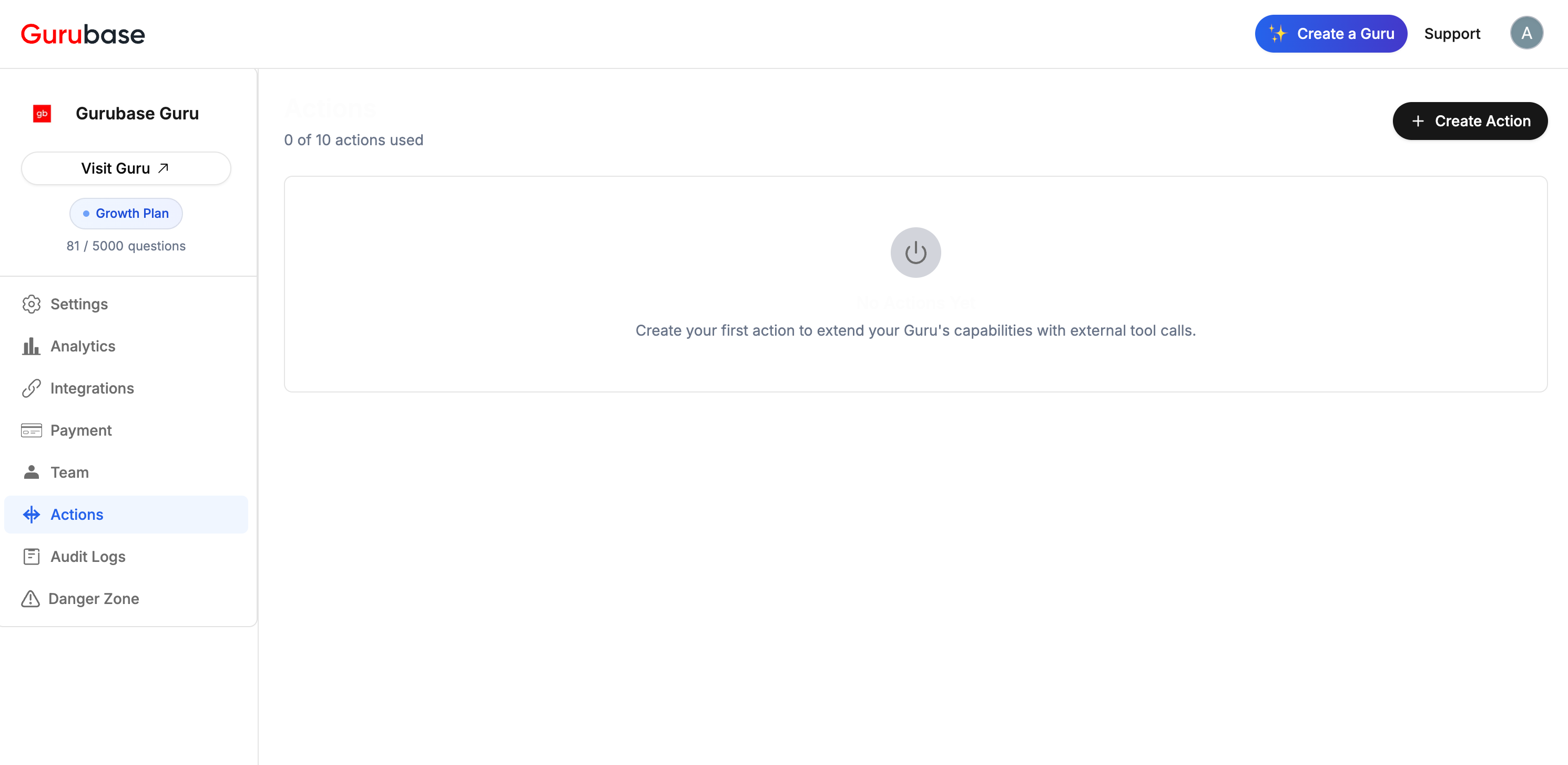
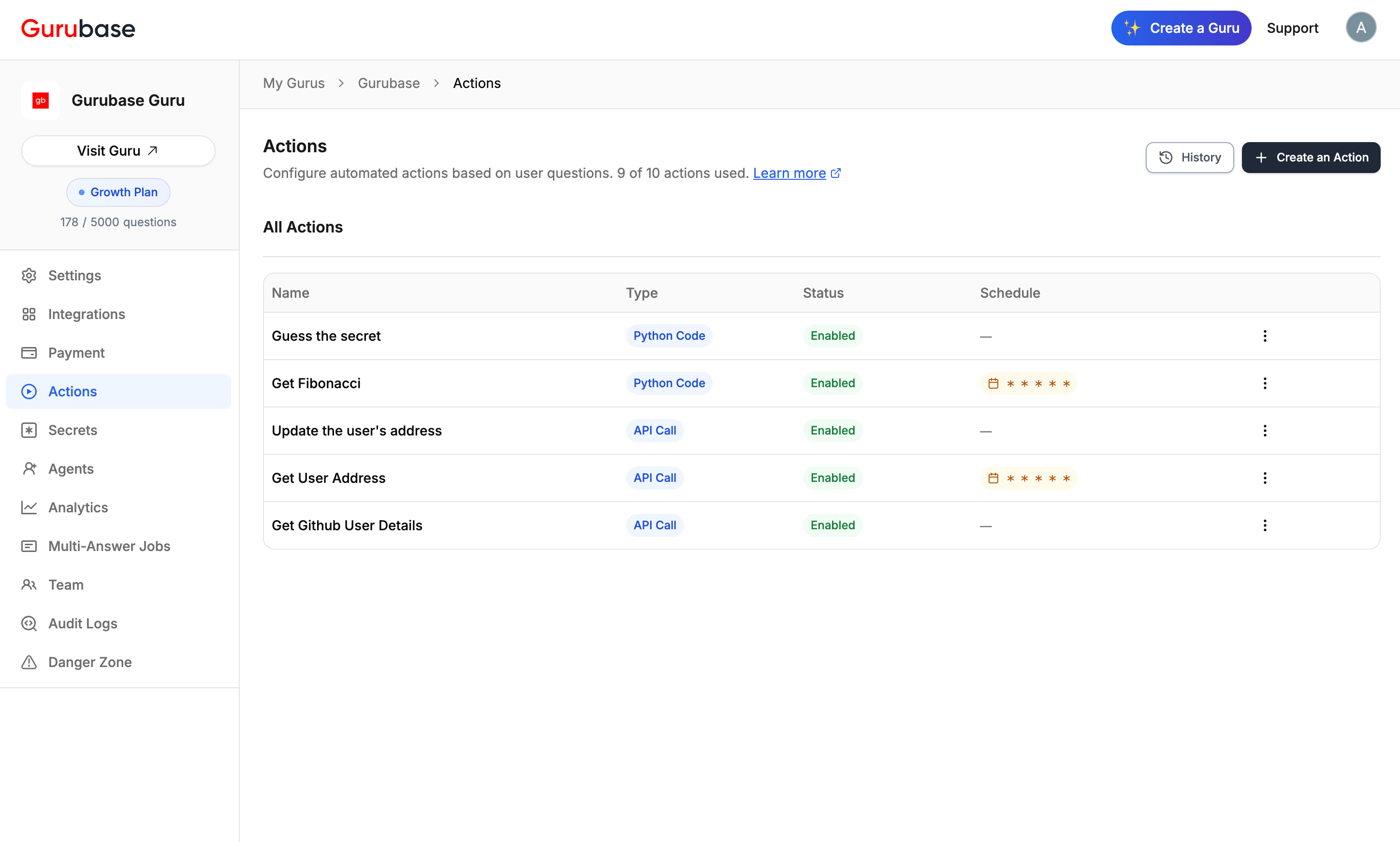 Each Guru has a limit on the number of actions based on your plan (shown as "5 of 10 actions used").
***
## How Actions Work
The Guru checks if the user's question matches your defined trigger conditions.
Parameters are automatically extracted from the user's question based on your descriptions.
Python code runs in an isolated container, or an HTTP request is made to your API endpoint.
The AI interprets and presents the results to the user.
Actions only execute if all required parameters can be extracted from the user's question (or have default values).
***
## Creating an Action
Each Guru has a limit on the number of actions based on your plan (shown as "5 of 10 actions used").
***
## How Actions Work
The Guru checks if the user's question matches your defined trigger conditions.
Parameters are automatically extracted from the user's question based on your descriptions.
Python code runs in an isolated container, or an HTTP request is made to your API endpoint.
The AI interprets and presents the results to the user.
Actions only execute if all required parameters can be extracted from the user's question (or have default values).
***
## Creating an Action
 ### Step 1: Basic Information
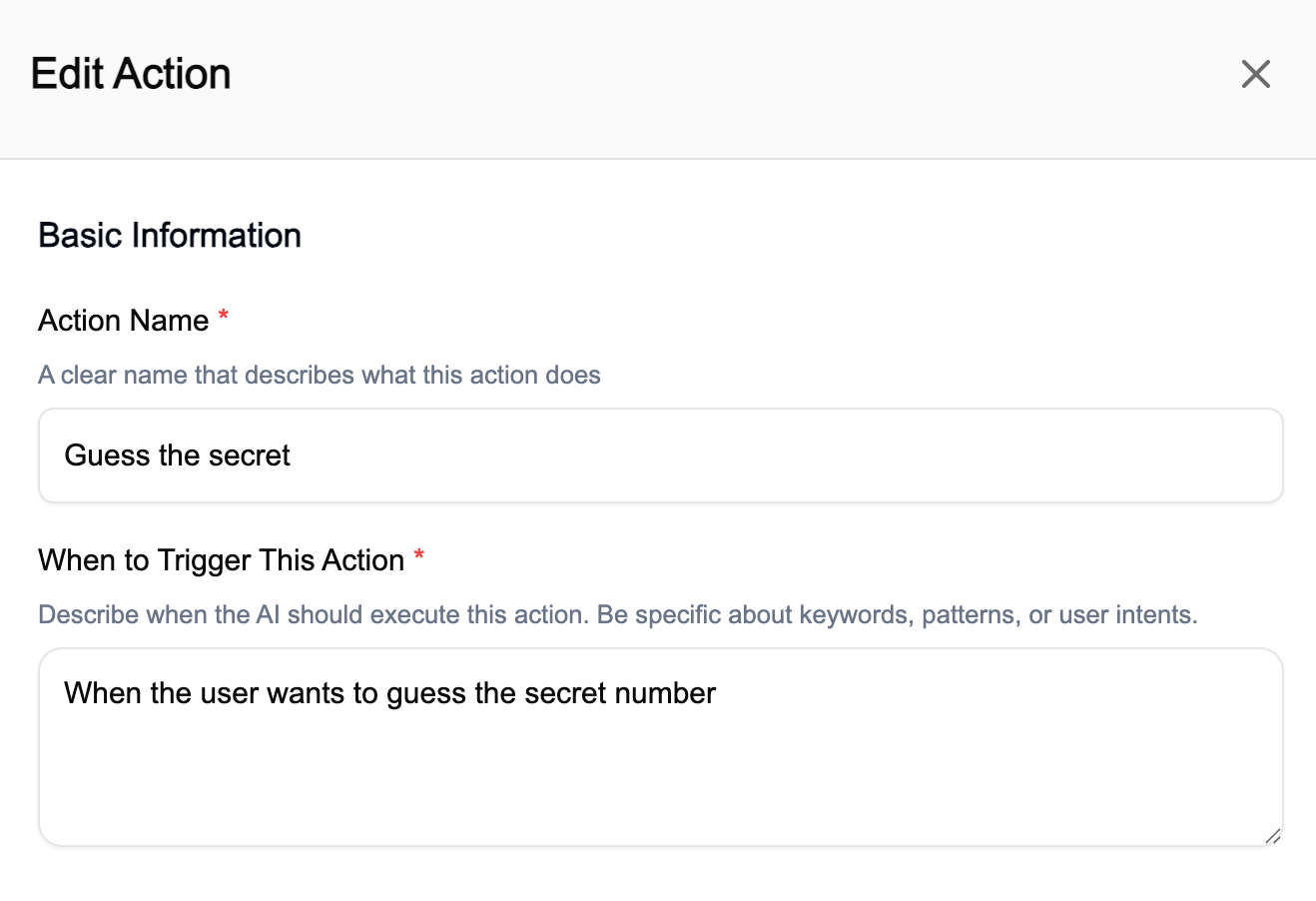 | Field | Description | Example |
| ------------------- | --------------------------------------------------- | ----------------------------------------------------- |
| **Action Name** | Descriptive name for your action | "Get Weather Data" |
| **When to Trigger** | Specific conditions for when this action should run | "When the user asks about current weather for a city" |
Be specific with trigger conditions. Instead of "When asking about data", use "When asking about current weather conditions for a specific location".
### Step 2: Define Parameters
| Field | Description | Example |
| ------------------- | --------------------------------------------------- | ----------------------------------------------------- |
| **Action Name** | Descriptive name for your action | "Get Weather Data" |
| **When to Trigger** | Specific conditions for when this action should run | "When the user asks about current weather for a city" |
Be specific with trigger conditions. Instead of "When asking about data", use "When asking about current weather conditions for a specific location".
### Step 2: Define Parameters
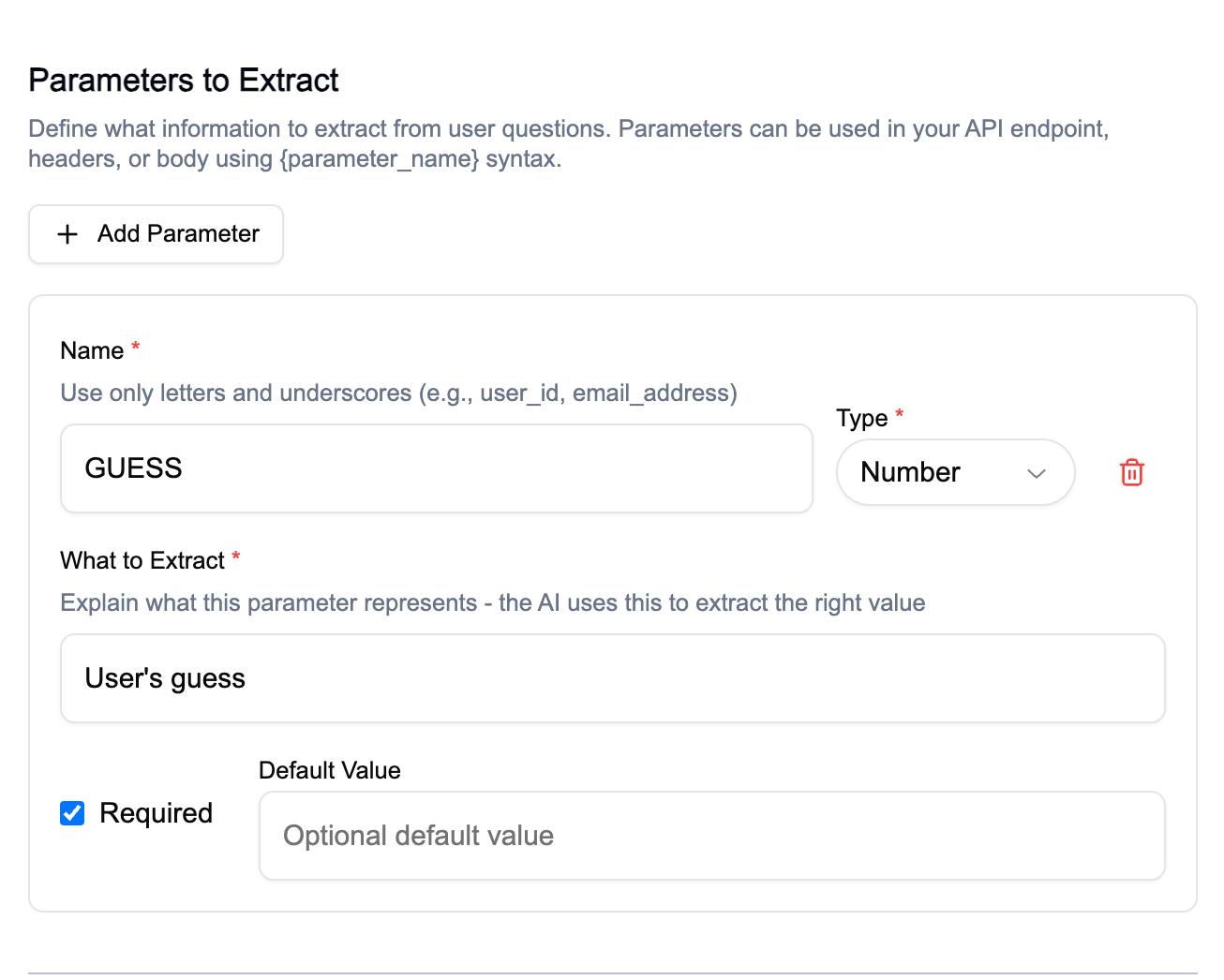 Parameters are values extracted from the user's question:
| Field | Description |
| ------------------- | ------------------------------------------------------ |
| **Name** | Letters and underscores only (e.g., `city`, `user_id`) |
| **Type** | String, Number, or Boolean |
| **What to Extract** | Clear description for extraction |
| **Required** | Must be provided for action to run |
| **Default Value** | Fallback if not extracted |
**How to use parameters:**
* **Python Code**: `os.environ.get('city')`
* **API Call**: `https://api.example.com/weather/{city}`
### Step 3: Configure Action Type
Choose **Python Code** or **API Call** and configure accordingly. See [Python Code Actions](#python-code-actions) or [API Call Actions](#api-call-actions) below.
### Step 4: Testing
Before enabling the action, use **Test Action** to run it with sample parameters. This verifies that parameters, secrets, and the action logic work as expected. Check that the output looks correct and that secrets are masked in the result.
***
## Python Code Actions
Parameters are values extracted from the user's question:
| Field | Description |
| ------------------- | ------------------------------------------------------ |
| **Name** | Letters and underscores only (e.g., `city`, `user_id`) |
| **Type** | String, Number, or Boolean |
| **What to Extract** | Clear description for extraction |
| **Required** | Must be provided for action to run |
| **Default Value** | Fallback if not extracted |
**How to use parameters:**
* **Python Code**: `os.environ.get('city')`
* **API Call**: `https://api.example.com/weather/{city}`
### Step 3: Configure Action Type
Choose **Python Code** or **API Call** and configure accordingly. See [Python Code Actions](#python-code-actions) or [API Call Actions](#api-call-actions) below.
### Step 4: Testing
Before enabling the action, use **Test Action** to run it with sample parameters. This verifies that parameters, secrets, and the action logic work as expected. Check that the output looks correct and that secrets are masked in the result.
***
## Python Code Actions
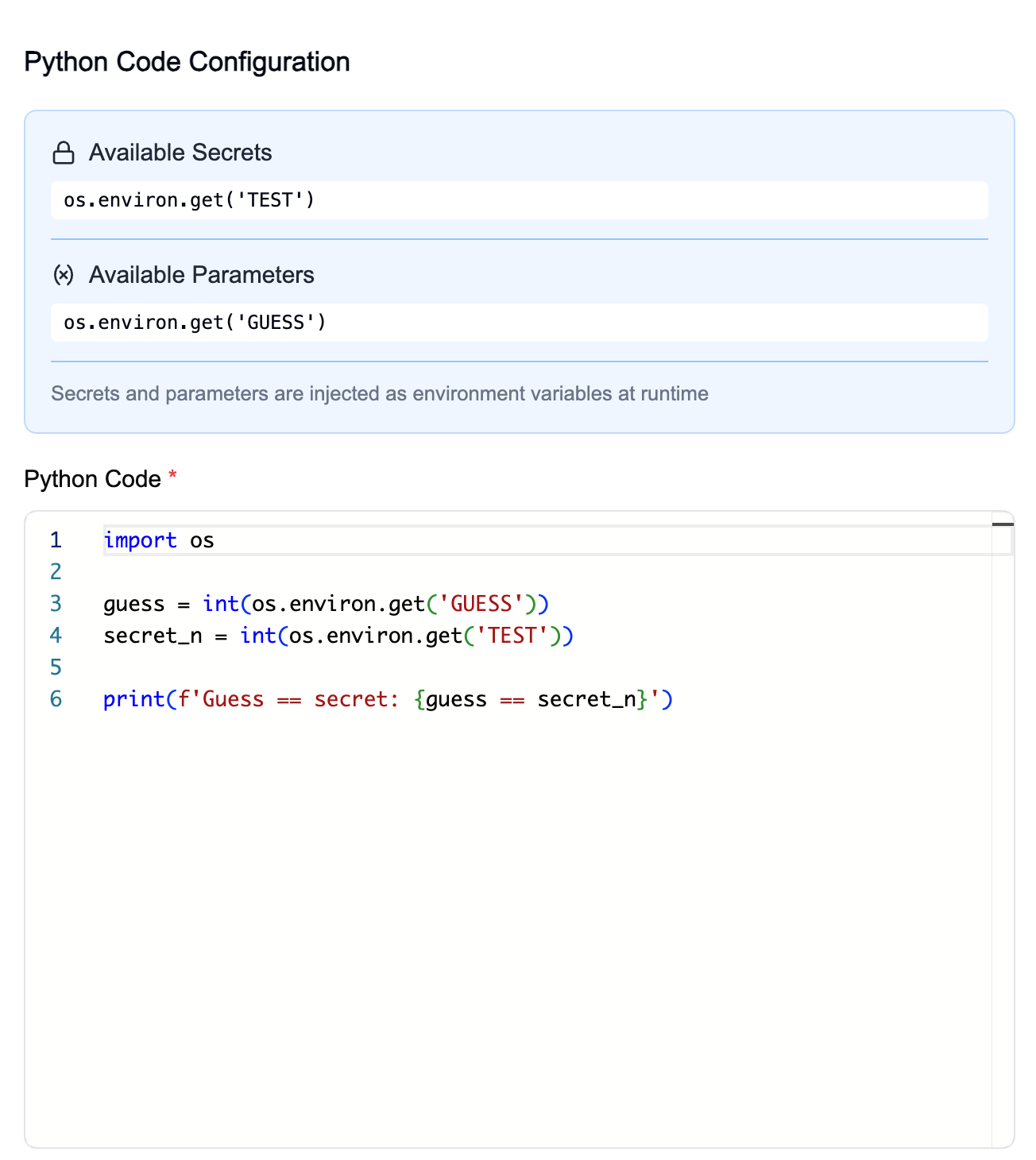 Execute custom Python code in isolated Docker containers. Secrets and parameters are injected as environment variables.
Each run uses a fresh container, destroyed after use
pandas, numpy, requests, openai, and more ready to use
Your `print()` output is captured and returned
All secrets are masked in output automatically
### Sandbox Environment
Python code runs inside an isolated sandbox container:
**Base Image:** `python:3.13-slim` with `git` and `curl` installed
```
anthropic==0.76.0
beautifulsoup4==4.14.3
boto3==1.43.36
httpx==0.28.1
instructor==1.14.3
lxml==6.1.0
matplotlib==3.10.8
numpy==2.2.3
openai==2.15.0
opencv-python==4.12.0.88
pandas==2.3.3
pillow==12.1.0
pydantic==2.12.5
requests==2.32.5
scikit-learn==1.8.0
scipy==1.17.0
seaborn==0.13.2
urllib3==2.6.3
```
You cannot install additional packages at runtime. If you need a package that isn't listed, [contact us](https://gurubase.io/contact/).
When using `boto3`, the AWS SDK endpoint URL must be a static string literal in your code. Dynamic values (env vars, kwargs expansion, computed strings) are rejected at validation time, and mutating AWS endpoint or metadata env vars (`AWS_ENDPOINT_URL*`, `AWS_EC2_METADATA_DISABLED`, `AWS_IGNORE_CONFIGURED_ENDPOINT_URLS`) from inside an action is blocked. EC2 instance metadata probing is disabled in the sandbox.
### Execution Limits
| Resource | Limit |
| --------------------- | ---------- |
| Memory | 512MB |
| CPU | 1 core |
| Max Processes | 128 |
| Timeout | 30 seconds |
| Temp Storage (`/tmp`) | 100MB |
### Security Restrictions
| Restriction | Description |
| -------------------- | --------------------------------- |
| Read-only filesystem | Only `/tmp` is writable |
| No binary execution | `/tmp` mounted with `noexec` flag |
| Dropped capabilities | All Linux capabilities removed |
| Network access | Allowed for API calls |
### Accessing Parameters and Secrets
Parameters and secrets are injected as environment variables:
```python theme={null}
import os
# Access a parameter extracted from user's question
username = os.environ.get('USERNAME')
# Access a secret configured in Guru Settings
api_key = os.environ.get('MY_API_KEY')
print(f"Fetching data for {username}...")
```
The `os` module is restricted. Only `os.environ`, `os.environ.get()`, and `os.getenv()` are allowed. Other `os` functions (`os.system()`, `os.popen()`, file operations) are blocked.
### Basic Pattern
Every Python action follows the same pattern:
```python theme={null}
import os
import requests
# 1. Get parameters (extracted from user's question)
order_id = os.environ.get('order_id')
# 2. Get secrets (configured in Guru Settings)
api_key = os.environ.get('STRIPE_API_KEY')
# 3. Call your API
response = requests.get(
"https://api.stripe.com/v1/refunds",
auth=(api_key, ''),
params={"limit": 10}
)
# 4. Process and print results (this is what the AI uses)
data = response.json()
print(f"Found {len(data.get('data', []))} refunds")
```
See [High-Impact Actions for Common Pain Points](#high-impact-actions-for-common-pain-points) for 10 production-ready examples with real API integrations.
***
## API Call Actions
Execute custom Python code in isolated Docker containers. Secrets and parameters are injected as environment variables.
Each run uses a fresh container, destroyed after use
pandas, numpy, requests, openai, and more ready to use
Your `print()` output is captured and returned
All secrets are masked in output automatically
### Sandbox Environment
Python code runs inside an isolated sandbox container:
**Base Image:** `python:3.13-slim` with `git` and `curl` installed
```
anthropic==0.76.0
beautifulsoup4==4.14.3
boto3==1.43.36
httpx==0.28.1
instructor==1.14.3
lxml==6.1.0
matplotlib==3.10.8
numpy==2.2.3
openai==2.15.0
opencv-python==4.12.0.88
pandas==2.3.3
pillow==12.1.0
pydantic==2.12.5
requests==2.32.5
scikit-learn==1.8.0
scipy==1.17.0
seaborn==0.13.2
urllib3==2.6.3
```
You cannot install additional packages at runtime. If you need a package that isn't listed, [contact us](https://gurubase.io/contact/).
When using `boto3`, the AWS SDK endpoint URL must be a static string literal in your code. Dynamic values (env vars, kwargs expansion, computed strings) are rejected at validation time, and mutating AWS endpoint or metadata env vars (`AWS_ENDPOINT_URL*`, `AWS_EC2_METADATA_DISABLED`, `AWS_IGNORE_CONFIGURED_ENDPOINT_URLS`) from inside an action is blocked. EC2 instance metadata probing is disabled in the sandbox.
### Execution Limits
| Resource | Limit |
| --------------------- | ---------- |
| Memory | 512MB |
| CPU | 1 core |
| Max Processes | 128 |
| Timeout | 30 seconds |
| Temp Storage (`/tmp`) | 100MB |
### Security Restrictions
| Restriction | Description |
| -------------------- | --------------------------------- |
| Read-only filesystem | Only `/tmp` is writable |
| No binary execution | `/tmp` mounted with `noexec` flag |
| Dropped capabilities | All Linux capabilities removed |
| Network access | Allowed for API calls |
### Accessing Parameters and Secrets
Parameters and secrets are injected as environment variables:
```python theme={null}
import os
# Access a parameter extracted from user's question
username = os.environ.get('USERNAME')
# Access a secret configured in Guru Settings
api_key = os.environ.get('MY_API_KEY')
print(f"Fetching data for {username}...")
```
The `os` module is restricted. Only `os.environ`, `os.environ.get()`, and `os.getenv()` are allowed. Other `os` functions (`os.system()`, `os.popen()`, file operations) are blocked.
### Basic Pattern
Every Python action follows the same pattern:
```python theme={null}
import os
import requests
# 1. Get parameters (extracted from user's question)
order_id = os.environ.get('order_id')
# 2. Get secrets (configured in Guru Settings)
api_key = os.environ.get('STRIPE_API_KEY')
# 3. Call your API
response = requests.get(
"https://api.stripe.com/v1/refunds",
auth=(api_key, ''),
params={"limit": 10}
)
# 4. Process and print results (this is what the AI uses)
data = response.json()
print(f"Found {len(data.get('data', []))} refunds")
```
See [High-Impact Actions for Common Pain Points](#high-impact-actions-for-common-pain-points) for 10 production-ready examples with real API integrations.
***
## API Call Actions
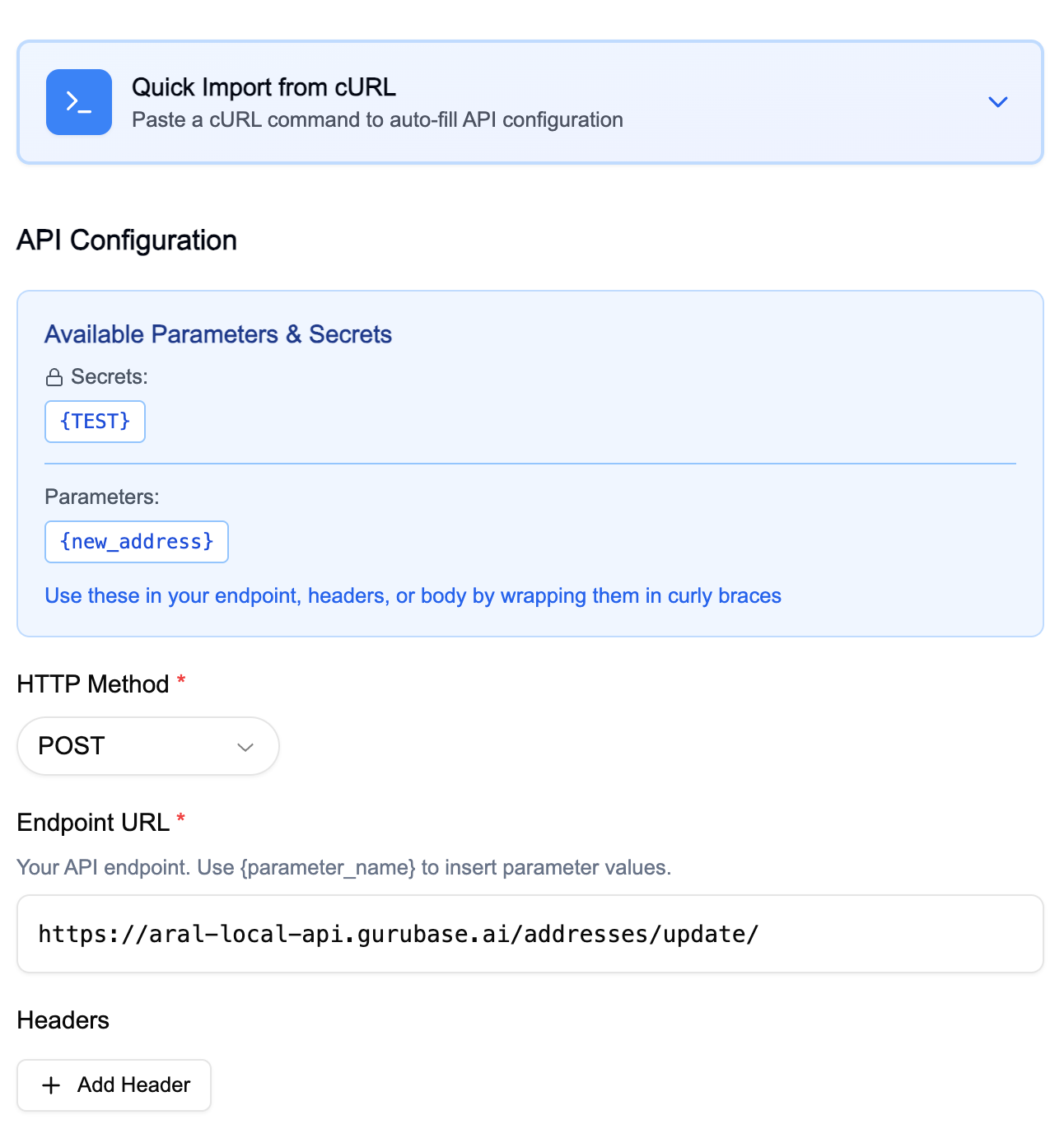 Configure HTTP requests to external APIs:
| Field | Description | Example |
| ---------------- | ---------------------------------------- | ----------------------------------------- |
| **HTTP Method** | GET, POST, PUT, PATCH, DELETE | `GET` |
| **Endpoint URL** | API endpoint with parameter placeholders | `https://api.github.com/users/{username}` |
| **Headers** | Authentication and content type | `Authorization: Bearer {API_KEY}` |
| **Request Body** | JSON payload (for POST/PUT/PATCH) | See below |
Configure HTTP requests to external APIs:
| Field | Description | Example |
| ---------------- | ---------------------------------------- | ----------------------------------------- |
| **HTTP Method** | GET, POST, PUT, PATCH, DELETE | `GET` |
| **Endpoint URL** | API endpoint with parameter placeholders | `https://api.github.com/users/{username}` |
| **Headers** | Authentication and content type | `Authorization: Bearer {API_KEY}` |
| **Request Body** | JSON payload (for POST/PUT/PATCH) | See below |
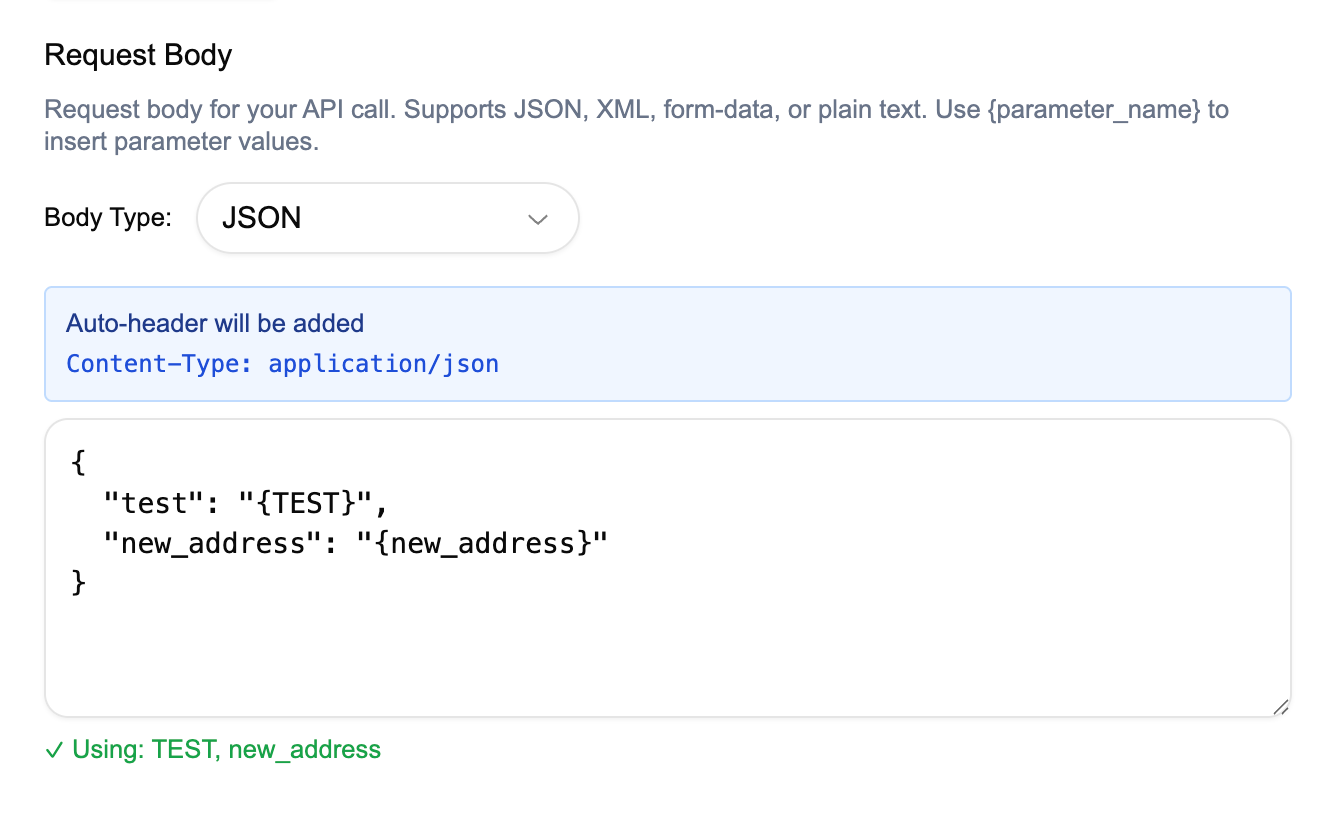 **Request Body Example:**
```json theme={null}
{
"user_id": "{user_id}",
"action": "update",
"data": "{payload}"
}
```
Use `{parameter_name}` or `{SECRET_NAME}` syntax anywhere in the URL, headers, or body. You can also reference the built-in variables `{GURUBASE_USER_EMAIL}`, `{GURUBASE_USER_NAME}`, `{GURUBASE_USER_GROUPS}`, and `{GURUBASE_GURU_SLUG}`. See [Built-in Variables](#built-in-variables) for details and limitations.
**Example URL with built-in variables:**
```
https://api.example.com/v1/orders?user={GURUBASE_USER_EMAIL}&guru={GURUBASE_GURU_SLUG}
```
***
## Built-in Variables
Gurubase automatically injects four reserved variables at execution time. These are available in both **Python Code** and **API Call** actions.
| Variable | Description |
| ---------------------- | ------------------------------------------------------------------------------- |
| `GURUBASE_USER_EMAIL` | Email of the user currently calling the action (not the action creator) |
| `GURUBASE_USER_NAME` | Display name of the calling user (falls back to email prefix if no name is set) |
| `GURUBASE_USER_GROUPS` | Comma-separated content group names the user belongs to (default: `Everyone`) |
| `GURUBASE_GURU_SLUG` | Slug of the Guru this action belongs to |
### Python Code Usage
```python theme={null}
import os
user_email = os.environ.get('GURUBASE_USER_EMAIL')
user_name = os.environ.get('GURUBASE_USER_NAME')
user_groups = os.environ.get('GURUBASE_USER_GROUPS')
guru_slug = os.environ.get('GURUBASE_GURU_SLUG')
# Example: filter Supabase rows by calling user's email
import requests
supabase_key = os.environ.get('SUPABASE_KEY')
response = requests.get(
"https://your-project.supabase.co/rest/v1/orders",
headers={
"apikey": supabase_key,
"Authorization": f"Bearer {supabase_key}"
},
params={"user_email": f"eq.{user_email}"}
)
data = response.json()
print(f"Found {len(data)} orders for {user_email}")
```
### API Call Usage
Use `{VARIABLE_NAME}` syntax in endpoint URL, headers, or request body:
```
https://api.example.com/v1/users/{GURUBASE_USER_EMAIL}/orders
```
Header example:
```
X-User-Email: {GURUBASE_USER_EMAIL}
X-User-Groups: {GURUBASE_USER_GROUPS}
```
These names are reserved. You cannot create a parameter or secret named `GURUBASE_USER_EMAIL`, `GURUBASE_USER_NAME`, `GURUBASE_USER_GROUPS`, or `GURUBASE_GURU_SLUG`. The action will be rejected at validation time.
User variables (`GURUBASE_USER_EMAIL`, `GURUBASE_USER_NAME`, `GURUBASE_USER_GROUPS`) are populated only when the action is called from the **Gurubase web UI** (chat or Test button). When the action runs via widget, bot integrations (Slack, Discord, Jira, GitHub, Zendesk), MCP, or any API-key-authenticated path, user email and name resolve to empty strings, and groups resolves to `Everyone`. `GURUBASE_GURU_SLUG` is always populated. Check for empty values if your action can be triggered from multiple paths.
***
## Managing Actions
**Request Body Example:**
```json theme={null}
{
"user_id": "{user_id}",
"action": "update",
"data": "{payload}"
}
```
Use `{parameter_name}` or `{SECRET_NAME}` syntax anywhere in the URL, headers, or body. You can also reference the built-in variables `{GURUBASE_USER_EMAIL}`, `{GURUBASE_USER_NAME}`, `{GURUBASE_USER_GROUPS}`, and `{GURUBASE_GURU_SLUG}`. See [Built-in Variables](#built-in-variables) for details and limitations.
**Example URL with built-in variables:**
```
https://api.example.com/v1/orders?user={GURUBASE_USER_EMAIL}&guru={GURUBASE_GURU_SLUG}
```
***
## Built-in Variables
Gurubase automatically injects four reserved variables at execution time. These are available in both **Python Code** and **API Call** actions.
| Variable | Description |
| ---------------------- | ------------------------------------------------------------------------------- |
| `GURUBASE_USER_EMAIL` | Email of the user currently calling the action (not the action creator) |
| `GURUBASE_USER_NAME` | Display name of the calling user (falls back to email prefix if no name is set) |
| `GURUBASE_USER_GROUPS` | Comma-separated content group names the user belongs to (default: `Everyone`) |
| `GURUBASE_GURU_SLUG` | Slug of the Guru this action belongs to |
### Python Code Usage
```python theme={null}
import os
user_email = os.environ.get('GURUBASE_USER_EMAIL')
user_name = os.environ.get('GURUBASE_USER_NAME')
user_groups = os.environ.get('GURUBASE_USER_GROUPS')
guru_slug = os.environ.get('GURUBASE_GURU_SLUG')
# Example: filter Supabase rows by calling user's email
import requests
supabase_key = os.environ.get('SUPABASE_KEY')
response = requests.get(
"https://your-project.supabase.co/rest/v1/orders",
headers={
"apikey": supabase_key,
"Authorization": f"Bearer {supabase_key}"
},
params={"user_email": f"eq.{user_email}"}
)
data = response.json()
print(f"Found {len(data)} orders for {user_email}")
```
### API Call Usage
Use `{VARIABLE_NAME}` syntax in endpoint URL, headers, or request body:
```
https://api.example.com/v1/users/{GURUBASE_USER_EMAIL}/orders
```
Header example:
```
X-User-Email: {GURUBASE_USER_EMAIL}
X-User-Groups: {GURUBASE_USER_GROUPS}
```
These names are reserved. You cannot create a parameter or secret named `GURUBASE_USER_EMAIL`, `GURUBASE_USER_NAME`, `GURUBASE_USER_GROUPS`, or `GURUBASE_GURU_SLUG`. The action will be rejected at validation time.
User variables (`GURUBASE_USER_EMAIL`, `GURUBASE_USER_NAME`, `GURUBASE_USER_GROUPS`) are populated only when the action is called from the **Gurubase web UI** (chat or Test button). When the action runs via widget, bot integrations (Slack, Discord, Jira, GitHub, Zendesk), MCP, or any API-key-authenticated path, user email and name resolve to empty strings, and groups resolves to `Everyone`. `GURUBASE_GURU_SLUG` is always populated. Check for empty values if your action can be triggered from multiple paths.
***
## Managing Actions
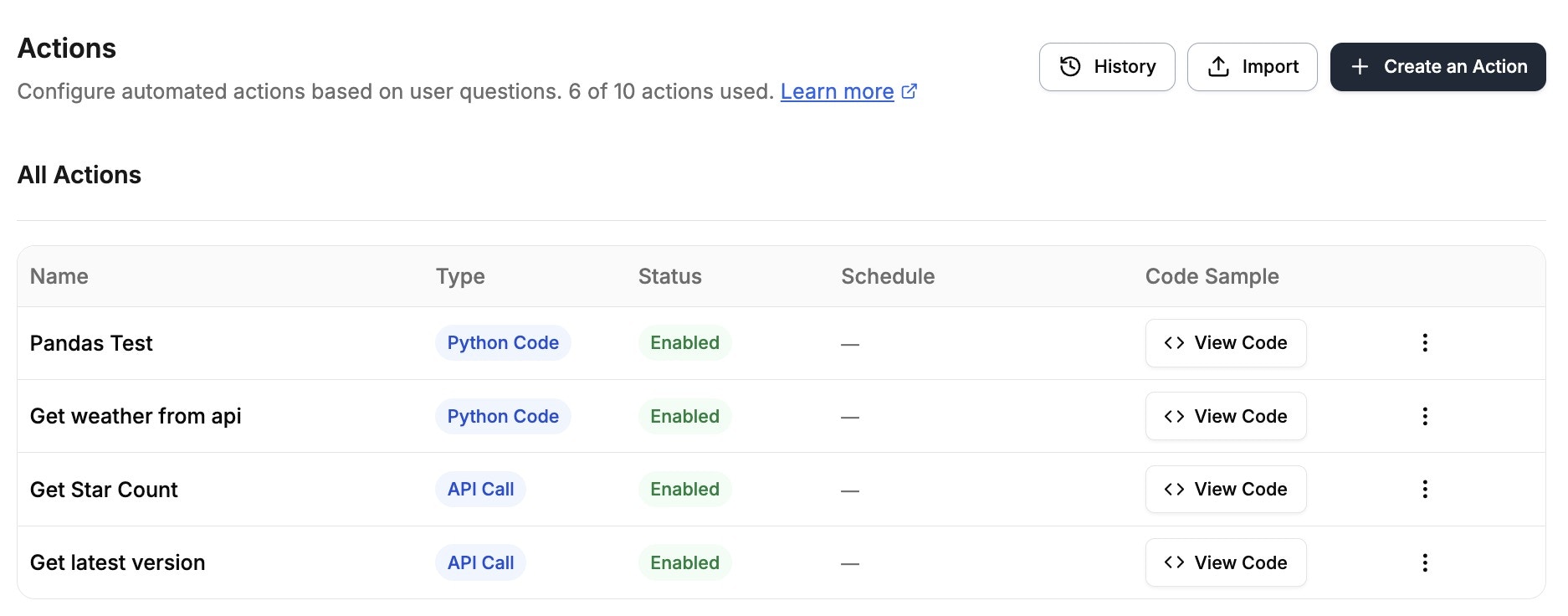 ### Dashboard Actions
| Action | Description |
| -------------------- | ------------------------------------- |
| **History** | View execution history of all actions |
| **Import** | Import action from JSON file |
| **Create an Action** | Create new action from scratch |
Execution history is retained for a limited number of days (5 days by default on Gurubase Cloud). The exact retention period is shown beneath the **Execution History** title on the History page.
### Per-Action Menu (⋮)
| Action | Description |
| ------------------ | --------------------- |
| **Edit** | Modify configuration |
| **Export** | Download as JSON file |
| **Trigger Action** | Run manually |
| **Disable** | Temporarily disable |
| **Delete** | Permanently remove |
If a secret used by an action is deleted, that action will be automatically disabled.
### How Actions Appear in Answers
### Dashboard Actions
| Action | Description |
| -------------------- | ------------------------------------- |
| **History** | View execution history of all actions |
| **Import** | Import action from JSON file |
| **Create an Action** | Create new action from scratch |
Execution history is retained for a limited number of days (5 days by default on Gurubase Cloud). The exact retention period is shown beneath the **Execution History** title on the History page.
### Per-Action Menu (⋮)
| Action | Description |
| ------------------ | --------------------- |
| **Edit** | Modify configuration |
| **Export** | Download as JSON file |
| **Trigger Action** | Run manually |
| **Disable** | Temporarily disable |
| **Delete** | Permanently remove |
If a secret used by an action is deleted, that action will be automatically disabled.
### How Actions Appear in Answers
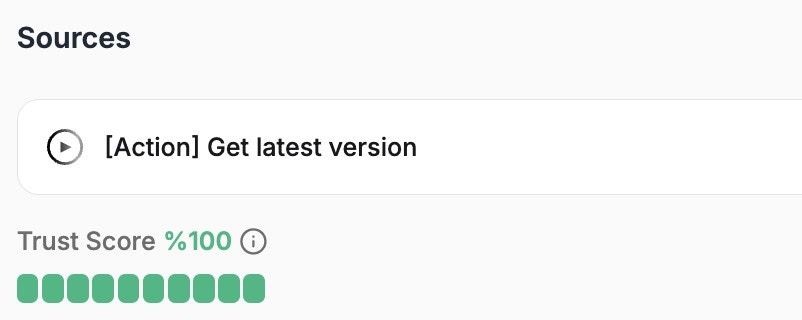 When an action is used, it's shown with the action name in the response.
***
## Secrets Management
When an action is used, it's shown with the action name in the response.
***
## Secrets Management
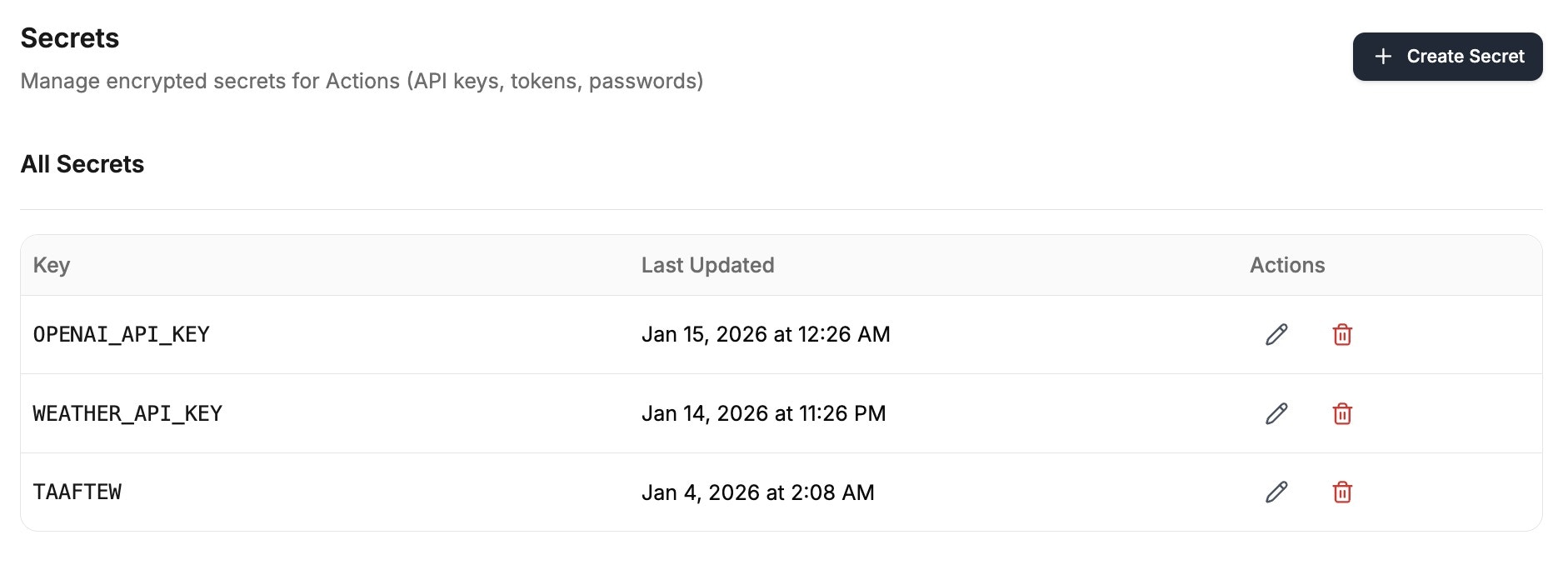 Secrets are encrypted credentials (API keys, tokens, passwords) stored in **Guru Settings → Secrets**.
| Feature | Description |
| ------------------- | ---------------------------------- |
| **Encryption** | AES-256 encryption at rest |
| **Masking** | Automatically masked in all output |
| **Python Access** | `os.environ.get('SECRET_NAME')` |
| **API Call Access** | `{SECRET_NAME}` syntax |
Secret names cannot conflict with parameter or variable names. Secret, variable, and parameter names also cannot be `GURUBASE_USER_EMAIL`, `GURUBASE_USER_NAME`, `GURUBASE_USER_GROUPS`, or `GURUBASE_GURU_SLUG` -- those are reserved for [built-in variables](#built-in-variables). Deleting a secret automatically disables all actions using it.
***
## Variables
Secrets are encrypted credentials (API keys, tokens, passwords) stored in **Guru Settings → Secrets**.
| Feature | Description |
| ------------------- | ---------------------------------- |
| **Encryption** | AES-256 encryption at rest |
| **Masking** | Automatically masked in all output |
| **Python Access** | `os.environ.get('SECRET_NAME')` |
| **API Call Access** | `{SECRET_NAME}` syntax |
Secret names cannot conflict with parameter or variable names. Secret, variable, and parameter names also cannot be `GURUBASE_USER_EMAIL`, `GURUBASE_USER_NAME`, `GURUBASE_USER_GROUPS`, or `GURUBASE_GURU_SLUG` -- those are reserved for [built-in variables](#built-in-variables). Deleting a secret automatically disables all actions using it.
***
## Variables
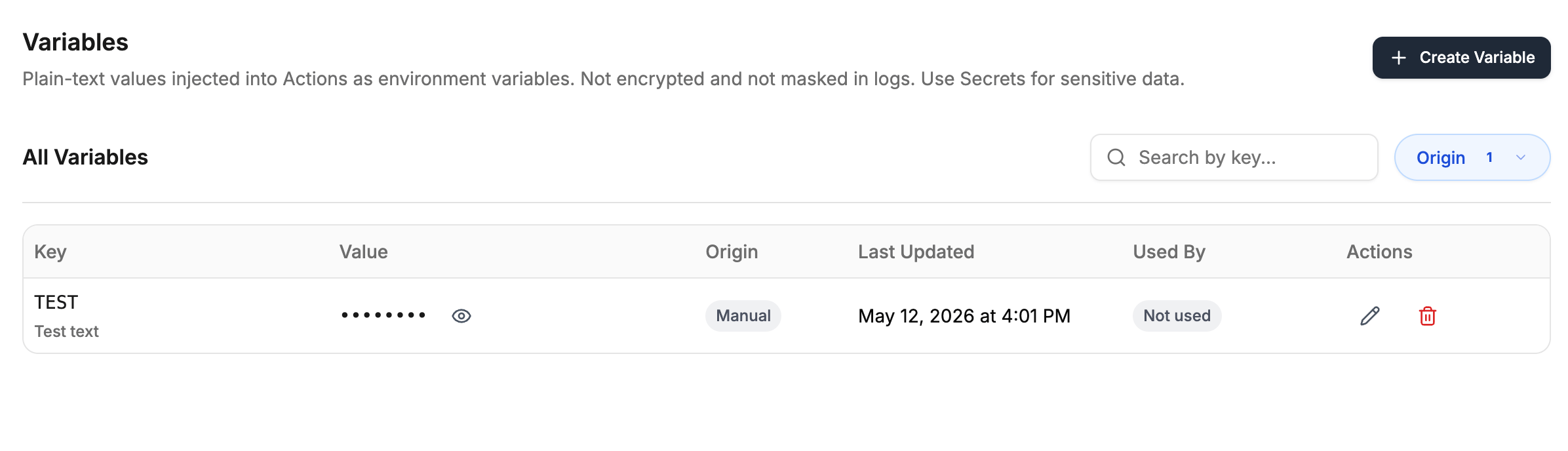 Variables are plain-text values stored in **Guru Settings → Variables**. They are available to actions at runtime, but the delivery mechanism differs by action type: **Python Code** actions receive them as real environment variables (read with `os.environ.get('VARIABLE_NAME')`), while **API Call** actions do not get process-level env injection and instead resolve `{VARIABLE_NAME}` placeholders in the request template (endpoint, headers, body, basic-auth fields) via string substitution at execution time. Variables stay plain-text in both paths: they are not encrypted at rest and not masked in execution logs or output, so use them only for non-sensitive configuration like base URLs, default IDs, or feature flags.
| Feature | Secrets | Variables |
| ---------------------------- | ------------------------------- | --------------------------------- |
| Encrypted at rest | Yes (AES-256) | No |
| Masked in execution output | Yes | No |
| Python Access | `os.environ.get('SECRET_NAME')` | `os.environ.get('VARIABLE_NAME')` |
| API Call Access | `{SECRET_NAME}` | `{VARIABLE_NAME}` |
| Visible in the UI after save | Hidden (show only on edit) | Show toggle on the list view |
**When to use which**
* **Secrets** for anything you would not want to appear in logs or exported audit data (API keys, tokens, passwords, signing keys).
* **Variables** for everything else (URLs, region codes, default IDs, switches). Pulling these into Variables makes it easy to update them in one place without editing every action.
Keys must be unique across Secrets and Variables for a guru. A variable named `API_BASE_URL` and a secret named `API_BASE_URL` cannot coexist. Reserved prefixes (`LD_`, `PYTHON_`, `EXECUTOR_`, `REDIS_`, `DOCKER_`) and reserved names like `GURUBASE_USER_EMAIL` are blocked for both. Deleting a variable automatically disables all actions that reference it.
**Automatic variables**
When you create an Action or Agent, Gurubase auto-creates a Variable whose value is that entity's slug: `ACTION__SLUG` holds the action's slug, and `AGENT__SLUG` holds the agent's slug. This lets one action invoke another by reference, for example by passing `os.environ.get('ACTION_LOOKUP_ORDER_SLUG')` to a tool call. These appear in the Variables page with an **Automatic** chip; edit and delete are disabled because the lifecycle is managed by Gurubase. Deleting the underlying action also removes the variable. The `ACTION_` and `AGENT_` prefixes are reserved for these auto-managed variables and cannot be used for user-created secrets or variables.
***
## Best Practices
| Avoid | Do Instead |
| ------------------------ | ---------------------------------------------------------------------- |
| "When asking about data" | "When asking about current weather conditions for a specific location" |
| "When user needs info" | "When user asks for a GitHub user's profile information" |
| Avoid | Do Instead |
| --------------- | ---------------------------------------------------------------------------------------------------- |
| `id` - "The ID" | `user_id` - "The unique identifier for the GitHub user whose profile information is being requested" |
| `city` - "City" | `city` - "The name of the city to get weather data for (e.g., London, New York)" |
* Always test actions with various parameter combinations
* Verify error handling for missing or invalid parameters
* Check that secrets are properly masked in output
* Each action should do one specific task
* Avoid actions that try to do too many things
* Create multiple simple actions instead of one complex one
***
## Multi-Step Workflows
Most real workflows don't fit into a single action. They chain reads with writes, or fan out writes across multiple systems in one turn. Gurubase runs every relevant action per turn, each selected and parameterized independently based on the user's question.
**A single turn can include:**
* **Reads** to pull live data from a database, CRM, or HR system.
* **Writes** that actually change state in the systems you own (create a ticket, submit a request, post a message).
* **Parallel fan-out** to multiple systems (create a Jira issue *and* DM an on-call engineer at the same time).
### How Gurubase Picks Multiple Actions per Turn
Each action's **condition prompt** is checked against the user's question. Any number of conditions can match in a single turn.
For every matched action, the LLM pulls the required parameters out of the conversation (including context from earlier turns).
Up to 3 actions execute concurrently. Results stream back as they complete.
Gurubase composes a single response that weaves together outputs from every action plus knowledge from your sources.
### Worked Example: Employee PTO Flow
This is the pattern demonstrated in the [HR Guru demo video](https://gurubase.io/actions/): an employee assistant that **reads** a PTO balance in one turn, then **writes** the request to SAP and pings the manager on Slack in the next. One conversation, two action types, three systems.
#### Action 1: Read the PTO balance (Python)
```json theme={null}
{
"name": "pto_balance_lookup",
"condition_prompt": "When the user asks how many PTO, vacation, or time-off days they have remaining.",
"action_type": "PYTHON_CODE",
"parameters": [],
"config": {
"code": "import os\nimport requests\n\nuser = os.environ['GURUBASE_USER_EMAIL']\nr = requests.get(\n f\"{os.environ['HR_API']}/pto\",\n params={'user': user},\n headers={'Authorization': f\"Bearer {os.environ['HR_TOKEN']}\"},\n)\ndata = r.json()\nprint(f\"{data['remaining']} days remaining · last used {data['last_used']}\")\n",
"timeout": 30
}
}
```
**What it does:** Reads the signed-in user's email from the built-in `GURUBASE_USER_EMAIL` variable, calls the HR API, prints the balance. The printed output is injected into the agent's answer.
**Sample response:** *"Hi Alex, you have 12 PTO days remaining this year. Last used on March 3, 2026 (2 days)."*
#### Action 2: Create the PTO request in SAP (API call)
```json theme={null}
{
"name": "submit_pto_request",
"condition_prompt": "When the user confirms they want to book, submit, or request specific PTO days. Extract the date the user wants off.",
"action_type": "API_CALL",
"parameters": [
{
"name": "date",
"type": "string",
"description": "The date the user wants to take off, as YYYY-MM-DD.",
"required": true
}
],
"config": {
"endpoint": "https://sap.example.com/api/v2/timeoff",
"method": "POST",
"headers": [
{ "key": "Authorization", "value": "Bearer {SAP_API_TOKEN}" },
{ "key": "Content-Type", "value": "application/json" }
],
"body": {
"employee_email": "{GURUBASE_USER_EMAIL}",
"start_date": "{date}",
"end_date": "{date}",
"type": "PTO"
}
}
}
```
**What it does:** POSTs to SAP's time-off endpoint. The signed-in user's email is pulled from `{GURUBASE_USER_EMAIL}`, the date comes from the extracted `date` parameter, and the SAP token is resolved from the encrypted `SAP_API_TOKEN` secret at execution time.
#### Action 3: Notify the manager (API call)
```json theme={null}
{
"name": "notify_manager",
"condition_prompt": "When a PTO request has been submitted and the user's manager should be notified.",
"action_type": "API_CALL",
"parameters": [
{
"name": "date",
"type": "string",
"description": "The date being requested off.",
"required": true
}
],
"config": {
"endpoint": "https://slack.com/api/chat.postMessage",
"method": "POST",
"headers": [
{ "key": "Authorization", "value": "Bearer {SLACK_BOT_TOKEN}" },
{ "key": "Content-Type", "value": "application/json" }
],
"body": {
"channel": "#hr-approvals",
"text": "{GURUBASE_USER_NAME} just requested {date} off via HR Guru."
}
}
}
```
**What it does:** Posts a Slack message to the HR approvals channel. The condition prompt is scoped so this fires alongside `submit_pto_request` (in the same turn), not as an independent action the LLM might pick on its own.
#### How it plays out
**Turn 1 (read)**
> **User:** How many PTO days do I have left?
>
> **Agent:** *(runs `pto_balance_lookup`)* Hi Alex, you have **12 PTO days** remaining this year. Last used on March 3, 2026 (2 days).
**Turn 2 (parallel writes)**
> **User:** Perfect. Book Friday off then.
>
> **Agent:** *(runs `submit_pto_request` and `notify_manager` in parallel)* Done. PTO request **#4892** submitted to SAP for **Friday, Apr 17**. The HR approvals channel has been notified on Slack.
Condition prompts are the glue. Write them specifically enough that `notify_manager` only fires alongside a real submission, not on every chat about PTO.
### Parallel vs Sequential
Matched actions always run **in parallel** within a single turn (up to 3 concurrent). This keeps response time low and is the right default when actions are independent, like SAP + Slack above.
If you need **true data dependencies** where the output of action A must feed action B, you have two options:
* **Multi-turn**: Let turn 1 finish, then drive turn 2 with the follow-up question. The conversation carries context between turns, which is how the PTO flow above works.
* **Agent actions**: Wrap the whole sequence in a single `AGENT`-type action whose internal tool-calling loop runs the steps in order. The agent sees each sub-tool's output before deciding on the next one.
For most workflows, parallel + multi-turn is plenty. Reach for `AGENT` only when one user request truly needs a deterministic multi-step pipeline.
### Testing the Flow
Before enabling a multi-action workflow for users:
* **Test each action standalone** from the Action Builder with hand-picked parameters. Every action should succeed in isolation.
* **Run a full conversation in the Guru preview.** Verify the right combination of actions fires at each turn and that parameters extract correctly from the user's wording.
* **Review the audit log.** Every run records inputs, outputs, duration, and the question that triggered it. This is the fastest way to debug extraction failures or parameter mismatches.
* **Stress-test condition overlap.** If two actions might fire for the same question, either tighten their condition prompts or accept that both will run (and make sure neither has side effects that break the other).
***
## Next Steps
Customize your Guru's responses and behavior
Add and manage knowledge sources
Monitor action usage and performance
Connect external MCP tools to your Guru
Build custom integrations
Variables are plain-text values stored in **Guru Settings → Variables**. They are available to actions at runtime, but the delivery mechanism differs by action type: **Python Code** actions receive them as real environment variables (read with `os.environ.get('VARIABLE_NAME')`), while **API Call** actions do not get process-level env injection and instead resolve `{VARIABLE_NAME}` placeholders in the request template (endpoint, headers, body, basic-auth fields) via string substitution at execution time. Variables stay plain-text in both paths: they are not encrypted at rest and not masked in execution logs or output, so use them only for non-sensitive configuration like base URLs, default IDs, or feature flags.
| Feature | Secrets | Variables |
| ---------------------------- | ------------------------------- | --------------------------------- |
| Encrypted at rest | Yes (AES-256) | No |
| Masked in execution output | Yes | No |
| Python Access | `os.environ.get('SECRET_NAME')` | `os.environ.get('VARIABLE_NAME')` |
| API Call Access | `{SECRET_NAME}` | `{VARIABLE_NAME}` |
| Visible in the UI after save | Hidden (show only on edit) | Show toggle on the list view |
**When to use which**
* **Secrets** for anything you would not want to appear in logs or exported audit data (API keys, tokens, passwords, signing keys).
* **Variables** for everything else (URLs, region codes, default IDs, switches). Pulling these into Variables makes it easy to update them in one place without editing every action.
Keys must be unique across Secrets and Variables for a guru. A variable named `API_BASE_URL` and a secret named `API_BASE_URL` cannot coexist. Reserved prefixes (`LD_`, `PYTHON_`, `EXECUTOR_`, `REDIS_`, `DOCKER_`) and reserved names like `GURUBASE_USER_EMAIL` are blocked for both. Deleting a variable automatically disables all actions that reference it.
**Automatic variables**
When you create an Action or Agent, Gurubase auto-creates a Variable whose value is that entity's slug: `ACTION__SLUG` holds the action's slug, and `AGENT__SLUG` holds the agent's slug. This lets one action invoke another by reference, for example by passing `os.environ.get('ACTION_LOOKUP_ORDER_SLUG')` to a tool call. These appear in the Variables page with an **Automatic** chip; edit and delete are disabled because the lifecycle is managed by Gurubase. Deleting the underlying action also removes the variable. The `ACTION_` and `AGENT_` prefixes are reserved for these auto-managed variables and cannot be used for user-created secrets or variables.
***
## Best Practices
| Avoid | Do Instead |
| ------------------------ | ---------------------------------------------------------------------- |
| "When asking about data" | "When asking about current weather conditions for a specific location" |
| "When user needs info" | "When user asks for a GitHub user's profile information" |
| Avoid | Do Instead |
| --------------- | ---------------------------------------------------------------------------------------------------- |
| `id` - "The ID" | `user_id` - "The unique identifier for the GitHub user whose profile information is being requested" |
| `city` - "City" | `city` - "The name of the city to get weather data for (e.g., London, New York)" |
* Always test actions with various parameter combinations
* Verify error handling for missing or invalid parameters
* Check that secrets are properly masked in output
* Each action should do one specific task
* Avoid actions that try to do too many things
* Create multiple simple actions instead of one complex one
***
## Multi-Step Workflows
Most real workflows don't fit into a single action. They chain reads with writes, or fan out writes across multiple systems in one turn. Gurubase runs every relevant action per turn, each selected and parameterized independently based on the user's question.
**A single turn can include:**
* **Reads** to pull live data from a database, CRM, or HR system.
* **Writes** that actually change state in the systems you own (create a ticket, submit a request, post a message).
* **Parallel fan-out** to multiple systems (create a Jira issue *and* DM an on-call engineer at the same time).
### How Gurubase Picks Multiple Actions per Turn
Each action's **condition prompt** is checked against the user's question. Any number of conditions can match in a single turn.
For every matched action, the LLM pulls the required parameters out of the conversation (including context from earlier turns).
Up to 3 actions execute concurrently. Results stream back as they complete.
Gurubase composes a single response that weaves together outputs from every action plus knowledge from your sources.
### Worked Example: Employee PTO Flow
This is the pattern demonstrated in the [HR Guru demo video](https://gurubase.io/actions/): an employee assistant that **reads** a PTO balance in one turn, then **writes** the request to SAP and pings the manager on Slack in the next. One conversation, two action types, three systems.
#### Action 1: Read the PTO balance (Python)
```json theme={null}
{
"name": "pto_balance_lookup",
"condition_prompt": "When the user asks how many PTO, vacation, or time-off days they have remaining.",
"action_type": "PYTHON_CODE",
"parameters": [],
"config": {
"code": "import os\nimport requests\n\nuser = os.environ['GURUBASE_USER_EMAIL']\nr = requests.get(\n f\"{os.environ['HR_API']}/pto\",\n params={'user': user},\n headers={'Authorization': f\"Bearer {os.environ['HR_TOKEN']}\"},\n)\ndata = r.json()\nprint(f\"{data['remaining']} days remaining · last used {data['last_used']}\")\n",
"timeout": 30
}
}
```
**What it does:** Reads the signed-in user's email from the built-in `GURUBASE_USER_EMAIL` variable, calls the HR API, prints the balance. The printed output is injected into the agent's answer.
**Sample response:** *"Hi Alex, you have 12 PTO days remaining this year. Last used on March 3, 2026 (2 days)."*
#### Action 2: Create the PTO request in SAP (API call)
```json theme={null}
{
"name": "submit_pto_request",
"condition_prompt": "When the user confirms they want to book, submit, or request specific PTO days. Extract the date the user wants off.",
"action_type": "API_CALL",
"parameters": [
{
"name": "date",
"type": "string",
"description": "The date the user wants to take off, as YYYY-MM-DD.",
"required": true
}
],
"config": {
"endpoint": "https://sap.example.com/api/v2/timeoff",
"method": "POST",
"headers": [
{ "key": "Authorization", "value": "Bearer {SAP_API_TOKEN}" },
{ "key": "Content-Type", "value": "application/json" }
],
"body": {
"employee_email": "{GURUBASE_USER_EMAIL}",
"start_date": "{date}",
"end_date": "{date}",
"type": "PTO"
}
}
}
```
**What it does:** POSTs to SAP's time-off endpoint. The signed-in user's email is pulled from `{GURUBASE_USER_EMAIL}`, the date comes from the extracted `date` parameter, and the SAP token is resolved from the encrypted `SAP_API_TOKEN` secret at execution time.
#### Action 3: Notify the manager (API call)
```json theme={null}
{
"name": "notify_manager",
"condition_prompt": "When a PTO request has been submitted and the user's manager should be notified.",
"action_type": "API_CALL",
"parameters": [
{
"name": "date",
"type": "string",
"description": "The date being requested off.",
"required": true
}
],
"config": {
"endpoint": "https://slack.com/api/chat.postMessage",
"method": "POST",
"headers": [
{ "key": "Authorization", "value": "Bearer {SLACK_BOT_TOKEN}" },
{ "key": "Content-Type", "value": "application/json" }
],
"body": {
"channel": "#hr-approvals",
"text": "{GURUBASE_USER_NAME} just requested {date} off via HR Guru."
}
}
}
```
**What it does:** Posts a Slack message to the HR approvals channel. The condition prompt is scoped so this fires alongside `submit_pto_request` (in the same turn), not as an independent action the LLM might pick on its own.
#### How it plays out
**Turn 1 (read)**
> **User:** How many PTO days do I have left?
>
> **Agent:** *(runs `pto_balance_lookup`)* Hi Alex, you have **12 PTO days** remaining this year. Last used on March 3, 2026 (2 days).
**Turn 2 (parallel writes)**
> **User:** Perfect. Book Friday off then.
>
> **Agent:** *(runs `submit_pto_request` and `notify_manager` in parallel)* Done. PTO request **#4892** submitted to SAP for **Friday, Apr 17**. The HR approvals channel has been notified on Slack.
Condition prompts are the glue. Write them specifically enough that `notify_manager` only fires alongside a real submission, not on every chat about PTO.
### Parallel vs Sequential
Matched actions always run **in parallel** within a single turn (up to 3 concurrent). This keeps response time low and is the right default when actions are independent, like SAP + Slack above.
If you need **true data dependencies** where the output of action A must feed action B, you have two options:
* **Multi-turn**: Let turn 1 finish, then drive turn 2 with the follow-up question. The conversation carries context between turns, which is how the PTO flow above works.
* **Agent actions**: Wrap the whole sequence in a single `AGENT`-type action whose internal tool-calling loop runs the steps in order. The agent sees each sub-tool's output before deciding on the next one.
For most workflows, parallel + multi-turn is plenty. Reach for `AGENT` only when one user request truly needs a deterministic multi-step pipeline.
### Testing the Flow
Before enabling a multi-action workflow for users:
* **Test each action standalone** from the Action Builder with hand-picked parameters. Every action should succeed in isolation.
* **Run a full conversation in the Guru preview.** Verify the right combination of actions fires at each turn and that parameters extract correctly from the user's wording.
* **Review the audit log.** Every run records inputs, outputs, duration, and the question that triggered it. This is the fastest way to debug extraction failures or parameter mismatches.
* **Stress-test condition overlap.** If two actions might fire for the same question, either tighten their condition prompts or accept that both will run (and make sure neither has side effects that break the other).
***
## Next Steps
Customize your Guru's responses and behavior
Add and manage knowledge sources
Monitor action usage and performance
Connect external MCP tools to your Guru
Build custom integrations