> ## Documentation Index
> Fetch the complete documentation index at: https://docs.gurubase.ai/llms.txt
> Use this file to discover all available pages before exploring further.
# Data Sources
> Learn about all the different types of data sources you can use with Gurubase
Build comprehensive knowledge bases by combining content from websites, documents, code repositories, and enterprise platforms. Gurubase indexes your content to create AI assistants that understand your specific domain.
## At a Glance
Crawl, sitemap import, or sync job
Documents & manuals
Policies & reports
Spreadsheets & data
Repositories & code
Video transcripts
Custom snippets
Tickets & articles
Wiki & docs
Issues & projects
Conversations
Docs & files
Knowledge base
***
## Reserved Labels
Some labels have special behavior in Gurubase. **Manual** labels can be added by you to any applicable data source. **Auto** labels are assigned automatically by the platform and cannot be set manually.
| Label | Assignment | Applies To | Behavior |
| -------------- | ---------- | ------------------------- | ------------------------------------------------------------------------------------------------------------------------------------------------------------------------------------------------------------------------------------------------------------------------------------------------------------------------------------------------------------------------------------------------------------------------------------------------------ |
| `mandatory` | Manual | Any data source | The source is **always included** in every answer's context, regardless of search relevance. Mandatory sources get independent retrieval and reranking, and bypass trust score filtering entirely. They also don't affect the [trust score](/guides/preventing-hallucinations#layer-3-trust-score---overall-answer-quality) calculation. Use this for compliance documents, core policies, or critical FAQs that must always be referenced in answers. |
| `playbooks` | Manual | Mermaid-type text sources | Makes the source appear in the **Playbooks tab** of the [Zendesk app](/integrations/bots/zendesk) with interactive flowcharts. Select "Mermaid" as the subtype when creating the text source. |
| `google_drive` | Auto | Google Drive sources | Automatically applied to all data sources imported via the [Google Drive integration](/integrations/ingestion/google_drive). Used internally to track and sync Google Drive content. |
Custom labels (e.g., `faq`, `onboarding`) can be added freely alongside reserved labels for your own organization and filtering needs.
## Access Control
Every data source has a **Visible to** field that controls which users can see its
content when they ask a question. When Visible to is empty, the source is marked
**Everyone** and every authenticated user of the guru can retrieve context from it.
When Visible to lists one or more groups, only users with membership in at least one
of those groups can see the source.
Everyone and specific groups are mutually exclusive. Selecting any group automatically
clears Everyone, and selecting Everyone clears any previously selected groups. This
prevents accidental exposure when switching between the two modes.
The **Visible to** field only appears in the source edit dialog after you have
created at least one content group for the guru and are signed in as a guru
maintainer. If you do not see the field, open **Team → Groups** and create a
group first, then reload the sources page. See
[Groups & Content Access Control](/guides/groups#setup) for the full setup walkthrough.
Access control applies only to authenticated users on the Gurubase Next.js UI. The
widget embed, public `/api/v1/answer/` endpoint, Slack, Discord, GitHub, Jira,
Zendesk, MCP server, and chat-completions endpoints currently return Everyone-only
results. Group-based access control for these surfaces is scheduled for v5.1+.
## For setup instructions and a worked example, see [Groups & Content Access Control](/guides/groups).
## File-Based Sources
### PDF Documents
Upload PDF files to index text and images. Perfect for documentation, research papers, and manuals.
| Feature | Description |
| --------------- | ----------------------------------------------------------------------------------------------------------------------------------------------------- |
| Text extraction | Full text content from all pages |
| Image indexing | Images within PDFs are described and stored, and are shown inline in answers when the question is about that image (diagram, screenshot, chart, etc.) |
| Batch upload | Upload multiple PDFs at once |
### Word Documents
Upload Word documents (.docx) to index text and image content. Ideal for policies, reports, and formatted documents.
| Feature | Description |
| --------------- | ---------------------------------------------------------------------------------------------------------- |
| Text extraction | Full text content from all pages |
| Image indexing | Images within docs are described and stored, and are shown inline in answers when the user asks about them |
| Batch upload | Upload multiple files at once |
### Excel Files
Upload spreadsheets (.xls, .xlsx) to index tabular data with header relationships.
| Feature | Description |
| ---------------------- | ----------------------------- |
| Cell extraction | Text content from all cells |
| Structure preservation | Maintains table relationships |
| Batch upload | Upload multiple files at once |
Learn how to prepare Excel files for optimal extraction
### Custom Text
Add custom text directly for FAQs, instructions, or any content that doesn't fit other categories.
| Option | Description |
| ----------- | ----------------------------------------------------------------------------------------------------------- |
| **Subtype** | Choose "Text" for plain content or "Mermaid" for flowcharts/diagrams |
| **Labels** | Add labels to organize and filter text sources (see [Reserved Labels](#reserved-labels) for special labels) |
***
## Web Sources
### Website Indexing
Index entire websites or specific pages. Gurubase extracts text, headings, and structured content.
| Method | Description |
| -------------------- | ------------------------------------------------------------ |
| **Sitemap Import** | Import all URLs from a sitemap (one-time) |
| **Sitemap Sync Job** | Scheduled job that periodically syncs content from a sitemap |
| **Crawl Website** | Automatically discover and crawl all internal pages |
| **Manual URLs** | Add specific page URLs |
Images from websites are also indexed (plan feature).
#### Sitemap Sync Job
A Sitemap Sync Job automatically keeps your knowledge base in sync with your website. On each run it:
* **Adds** new URLs found in the sitemap
* **Updates** pages whose content has changed (by comparing fresh content against stored content)
* **Removes** pages that are no longer in the sitemap
* **Retries** URLs that failed on the previous run
To create a sync job:
1. Navigate to your Guru's settings page
2. Click **Add Websites** and select **Sitemap Job**
3. Provide a **sitemap URL** (e.g., `https://example.com/sitemap.xml`)
4. Set a **sync interval** between 6 and 24 hours (default: 12 hours)
5. Optionally configure URL filtering with include/exclude patterns
The sitemap is the **source of truth**. URLs not present in the sitemap will be removed from your knowledge base. If the sitemap is unreachable, no changes are made and all existing data is preserved.
#### URL Filtering (fnmatch Patterns)
Sitemap Sync Jobs support **include** and **exclude** pattern lists to control which URLs are indexed. Patterns use Python's `fnmatch` syntax where `*` matches everything (including `/`), `?` matches a single character, and `[seq]` matches any character in the sequence.
* **Include patterns**: Only URLs matching at least one pattern are indexed. Leave empty to include all URLs.
* **Exclude patterns**: URLs matching any pattern are skipped, regardless of include patterns. Excludes are evaluated first.
| Pattern | Type | Effect |
| --------------------------- | ------- | -------------------------------------- |
| `*/docs/*` | Include | Only index pages under `/docs/` |
| `*/blog/*` | Exclude | Skip all blog pages |
| `*?utm_*` | Exclude | Skip URLs with UTM tracking parameters |
| `https://example.com/api/*` | Exclude | Skip the API reference section |
| `*.html` | Include | Only index `.html` pages |
| `*/v2/*` | Include | Only index v2 documentation |
You can combine multiple include and exclude patterns for precise control.
#### Crawl Options
| Option | Description |
| --------------------- | ------------------------------------------------------------------------------------------------------------------------------------------------------------------------------------- |
| **URL Scope** | The crawler only discovers URLs that start with the provided path. Use `https://example.com/` for the entire site, or `https://example.com/docs/` to crawl only the `/docs/` section. |
| **Skip Query Params** | Enabled by default. Strips query parameters from URLs (e.g., `?utm_source=...`). Disable for paginated content like `?page=1`, `?page=2`. |
| **Sort URLs** | Click the sort button (A-Z icon) to alphabetically sort discovered URLs. |
**Skipped Paths**: The crawler automatically skips non-content paths like `/feed/`, `/rss/`, `/static/`, `/assets/`, `/media/`, `/wp-admin/`, `/wp-json/`, `/_static/`, `/_sources/`, and common file extensions (images, PDFs, CSS, JS, etc.).
### YouTube Videos
Import video transcripts and metadata from YouTube channels, playlists, or individual videos.
| Method | Description |
| ------------------- | ----------------------------------- |
| **Channel Import** | All videos from a YouTube channel |
| **Playlist Import** | All videos from a specific playlist |
| **Manual URLs** | Specific video URLs |
***
## Code Repositories
### GitHub
Index repositories to make code, documentation, and README files searchable. Supports public and private repositories.
| Feature | Description |
| ------------- | ---------------------------------- |
| Glob patterns | Control which files are indexed |
| Private repos | Use GitHub tokens for access |
| Code + docs | Index code files and documentation |
**Token Requirements:**
| Token Type | Permissions Required |
| ------------ | ------------------------------------- |
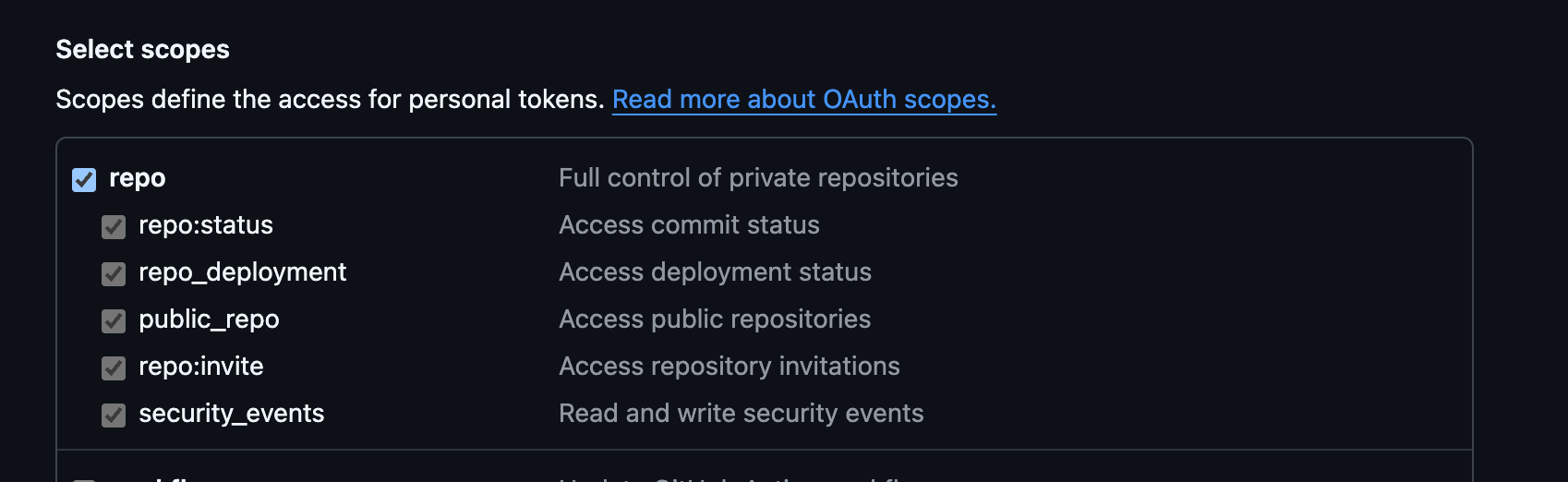
| Classic | `repo` scope |
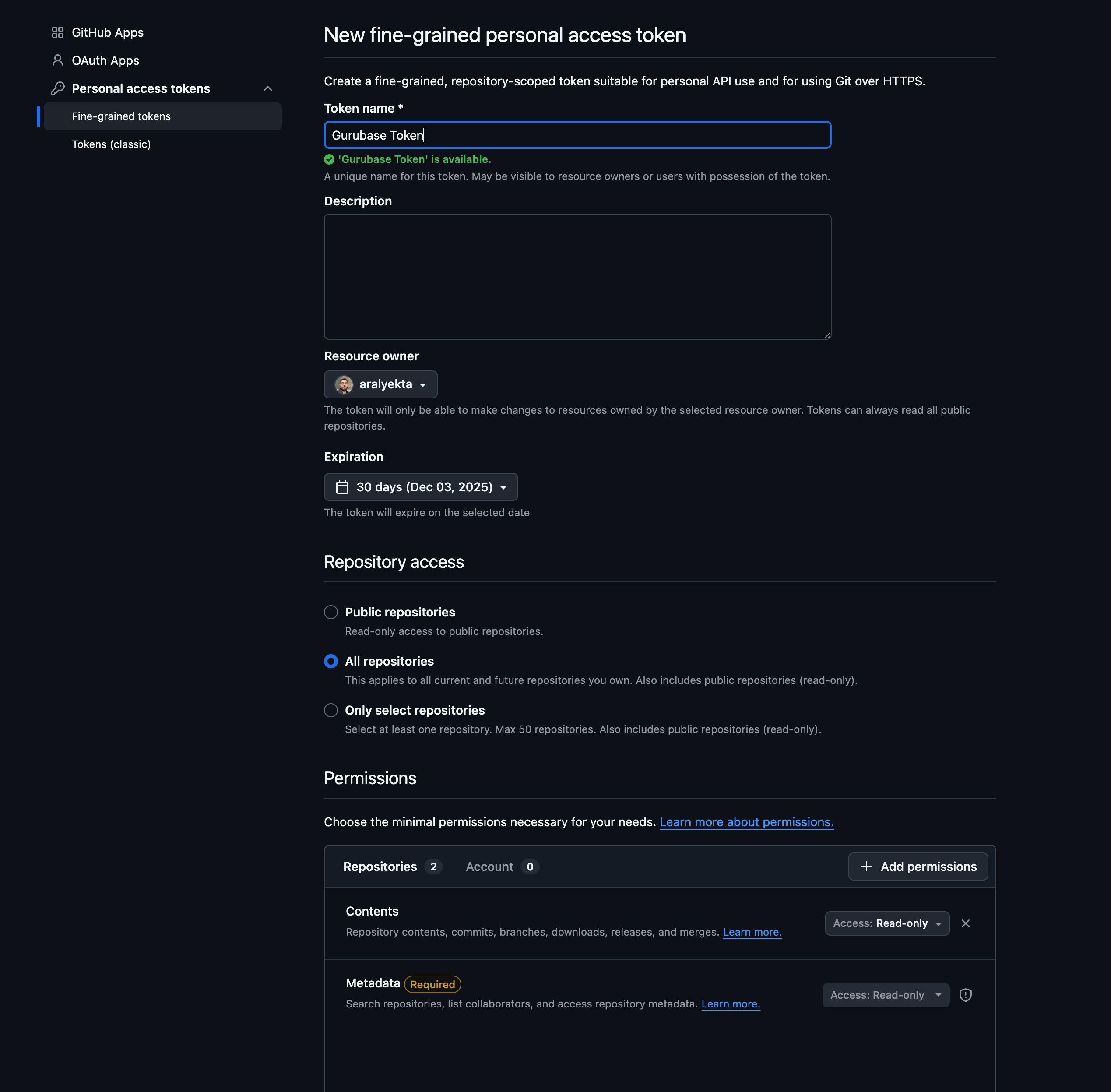
| Fine-grained | "Contents" (read) + "Metadata" (read) |
| Public repos | No token needed |
1. Go to [GitHub Tokens (classic)](https://github.com/settings/tokens) (GitHub Settings → Developer settings → Personal access tokens → Tokens (classic))
2. Click **Generate new token (classic)**
3. Under **Select scopes**, check the **repo** checkbox (this grants full control of private repositories)
 1. Go to [GitHub Fine-grained tokens](https://github.com/settings/personal-access-tokens) (GitHub Settings → Developer settings → Personal access tokens → Fine-grained tokens)
2. Click **Generate new token**
3. Enter a **Token name** (e.g., "Gurubase Token")
4. Set **Expiration** as needed
5. Under **Repository access**, select one of:
* **All repositories** - Access all current and future repositories
* **Only select repositories** - Choose specific repositories (max 50)
6. Under **Permissions** → **Repository permissions**, add:
* **Contents**: Read-only
* **Metadata**: Read-only (required)
1. Go to [GitHub Fine-grained tokens](https://github.com/settings/personal-access-tokens) (GitHub Settings → Developer settings → Personal access tokens → Fine-grained tokens)
2. Click **Generate new token**
3. Enter a **Token name** (e.g., "Gurubase Token")
4. Set **Expiration** as needed
5. Under **Repository access**, select one of:
* **All repositories** - Access all current and future repositories
* **Only select repositories** - Choose specific repositories (max 50)
6. Under **Permissions** → **Repository permissions**, add:
* **Contents**: Read-only
* **Metadata**: Read-only (required)
 **Glob Patterns:**
The Glob Pattern field is a multi-line input. **Each line is one pattern.**
Lines starting with `!` exclude. Blank lines and lines starting with `#` are
ignored.
| Pattern | Matches |
| ------------------------ | ----------------------------------------------------- |
| `**/*.py` | All Python files (recursive) |
| `**/*.{js,ts}` | All JavaScript and TypeScript files (brace expansion) |
| `packages/**` | Everything inside packages folder |
| `!**/test_*.py` | Exclude Python test files |
| `!(CHANGELOG_LEGACY).md` | Exclude `CHANGELOG_LEGACY.md` (extglob) |
**Mixing includes and excludes** — combine them by writing one per line:
```
docs/**/*.md
!docs/CHANGELOG_LEGACY.md
```
This indexes every Markdown file under `docs/` except `CHANGELOG_LEGACY.md`.
Patterns support recursive globstar (`**`), brace expansion (`{a,b}`), extglob
(`!(...)`, `@(...)`, `+(...)`, `*(...)`, `?(...)`), and gitignore-style
negation via leading `!` on its own line.
Test your patterns with [globster.xyz](https://globster.xyz/) before adding.
***
## Platform Integrations
Platform integrations provide automated syncing and deeper integration with enterprise tools.
### Zendesk
Index support tickets and help center articles. Set up backfill jobs for automated syncing.
Import tickets, articles, comments, and attachments
### Confluence
Index Atlassian Confluence spaces and pages. Supports CQL queries for advanced filtering.
Sync team documentation and wiki pages
### Jira
Index project issues, tickets, and related documentation.
Import issues and project data
### Slack
Index Slack conversations and threads. Configure trusted users for targeted content.
Capture team knowledge from conversations
### Google Drive
Connect Google Drive to index documents, spreadsheets, and files.
Sync Google Docs, Sheets, and files
### Salesforce
Index Salesforce Knowledge Base articles. Supports SOQL queries for filtering.
Import knowledge base articles
***
## Managing Sources in Bulk
The Sources table supports multi-select checkboxes so you can act on many sources at once instead of row by row. Tick the sources you want, then use the bulk action bar to:
* **Reindex** every selected source in one step.
* **Delete** every selected source.
* **Assign labels** to the selection. The entered labels replace each source's current labels; protected labels such as `google_drive` are preserved automatically.
Bulk actions are queued alongside your other pending edits and applied together when you click **Update Guru**. Rows that are currently processing or being deleted are excluded from selection.
## Reindexing Sources
Reindexing refreshes what your Guru has stored for a source. Behavior depends on the source type:
| Source type | What reindex does |
| ------------------------------------------------ | -------------------------------------------------------------------------------------------------------------------------------------------------------------------------------------------------------------------------------------------------------------------------------------------------------------------------------------------------------------------------------------------------------------------------------------------------------------------------------------- |
| **Website, Sitemap Job** | Re-fetches the URL and re-embeds the fresh content. |
| **YouTube** | Re-fetches the transcript and re-embeds it. |
| **GitHub** | Re-clones the repo and re-embeds the matching files. |
| **PDF, Word, Excel, Text** | Re-embeds the content Gurubase already extracted. The file is **not** re-fetched, so uploaded documents and Google Drive-synced documents behave the same way and no live source connection is required. To ingest a newer version of an uploaded file, upload the new version instead. For a Google Drive-synced file, pick up the latest version from Drive using **Sync Now** on the [Google Drive integration](/integrations/ingestion/google_drive) rather than per-file reindex. |
| **Zendesk, Confluence, Jira, Slack, Salesforce** | Handled by their backfill jobs. Use the integration's sync controls rather than per-source reindex. |
| **Google Drive** | Per-file reindex re-embeds the already-extracted content (same as the file row above). To pull the latest version of files from Drive, use **Sync Now** on the [Google Drive integration](/integrations/ingestion/google_drive); the two actions are not interchangeable. |
Reindex is available from each row's action menu and from the bulk action bar.
## Best Practices
* **Mix source types** - Combine documents, websites, and integrations for comprehensive coverage
* **Use labels** - Organize text sources with labels (e.g., `playbooks`, `faq`)
* **Platform integrations** - Use for content that changes frequently
* **Review indexed content** - Check what's actually indexed in your Guru's sources
* **Use filtering** - Glob patterns for GitHub, CQL for Confluence, SOQL for Salesforce
* **Test your Guru** - Ask sample questions to verify content quality
* **Backfill jobs** - Set up automated syncing for Zendesk, Confluence, Jira, Slack
* **Sitemap Sync Jobs** - Automatically keep website content in sync with your sitemap
* **Reindex regularly** - Reindex file, text, website, YouTube, and GitHub sources from the Sources table; use bulk selection to reindex many at once
* **Monitor status** - Check integration status in your Guru's settings
***
## Next Steps
Step-by-step guide to building your AI assistant
Embed your Guru on your website
**Glob Patterns:**
The Glob Pattern field is a multi-line input. **Each line is one pattern.**
Lines starting with `!` exclude. Blank lines and lines starting with `#` are
ignored.
| Pattern | Matches |
| ------------------------ | ----------------------------------------------------- |
| `**/*.py` | All Python files (recursive) |
| `**/*.{js,ts}` | All JavaScript and TypeScript files (brace expansion) |
| `packages/**` | Everything inside packages folder |
| `!**/test_*.py` | Exclude Python test files |
| `!(CHANGELOG_LEGACY).md` | Exclude `CHANGELOG_LEGACY.md` (extglob) |
**Mixing includes and excludes** — combine them by writing one per line:
```
docs/**/*.md
!docs/CHANGELOG_LEGACY.md
```
This indexes every Markdown file under `docs/` except `CHANGELOG_LEGACY.md`.
Patterns support recursive globstar (`**`), brace expansion (`{a,b}`), extglob
(`!(...)`, `@(...)`, `+(...)`, `*(...)`, `?(...)`), and gitignore-style
negation via leading `!` on its own line.
Test your patterns with [globster.xyz](https://globster.xyz/) before adding.
***
## Platform Integrations
Platform integrations provide automated syncing and deeper integration with enterprise tools.
### Zendesk
Index support tickets and help center articles. Set up backfill jobs for automated syncing.
Import tickets, articles, comments, and attachments
### Confluence
Index Atlassian Confluence spaces and pages. Supports CQL queries for advanced filtering.
Sync team documentation and wiki pages
### Jira
Index project issues, tickets, and related documentation.
Import issues and project data
### Slack
Index Slack conversations and threads. Configure trusted users for targeted content.
Capture team knowledge from conversations
### Google Drive
Connect Google Drive to index documents, spreadsheets, and files.
Sync Google Docs, Sheets, and files
### Salesforce
Index Salesforce Knowledge Base articles. Supports SOQL queries for filtering.
Import knowledge base articles
***
## Managing Sources in Bulk
The Sources table supports multi-select checkboxes so you can act on many sources at once instead of row by row. Tick the sources you want, then use the bulk action bar to:
* **Reindex** every selected source in one step.
* **Delete** every selected source.
* **Assign labels** to the selection. The entered labels replace each source's current labels; protected labels such as `google_drive` are preserved automatically.
Bulk actions are queued alongside your other pending edits and applied together when you click **Update Guru**. Rows that are currently processing or being deleted are excluded from selection.
## Reindexing Sources
Reindexing refreshes what your Guru has stored for a source. Behavior depends on the source type:
| Source type | What reindex does |
| ------------------------------------------------ | -------------------------------------------------------------------------------------------------------------------------------------------------------------------------------------------------------------------------------------------------------------------------------------------------------------------------------------------------------------------------------------------------------------------------------------------------------------------------------------- |
| **Website, Sitemap Job** | Re-fetches the URL and re-embeds the fresh content. |
| **YouTube** | Re-fetches the transcript and re-embeds it. |
| **GitHub** | Re-clones the repo and re-embeds the matching files. |
| **PDF, Word, Excel, Text** | Re-embeds the content Gurubase already extracted. The file is **not** re-fetched, so uploaded documents and Google Drive-synced documents behave the same way and no live source connection is required. To ingest a newer version of an uploaded file, upload the new version instead. For a Google Drive-synced file, pick up the latest version from Drive using **Sync Now** on the [Google Drive integration](/integrations/ingestion/google_drive) rather than per-file reindex. |
| **Zendesk, Confluence, Jira, Slack, Salesforce** | Handled by their backfill jobs. Use the integration's sync controls rather than per-source reindex. |
| **Google Drive** | Per-file reindex re-embeds the already-extracted content (same as the file row above). To pull the latest version of files from Drive, use **Sync Now** on the [Google Drive integration](/integrations/ingestion/google_drive); the two actions are not interchangeable. |
Reindex is available from each row's action menu and from the bulk action bar.
## Best Practices
* **Mix source types** - Combine documents, websites, and integrations for comprehensive coverage
* **Use labels** - Organize text sources with labels (e.g., `playbooks`, `faq`)
* **Platform integrations** - Use for content that changes frequently
* **Review indexed content** - Check what's actually indexed in your Guru's sources
* **Use filtering** - Glob patterns for GitHub, CQL for Confluence, SOQL for Salesforce
* **Test your Guru** - Ask sample questions to verify content quality
* **Backfill jobs** - Set up automated syncing for Zendesk, Confluence, Jira, Slack
* **Sitemap Sync Jobs** - Automatically keep website content in sync with your sitemap
* **Reindex regularly** - Reindex file, text, website, YouTube, and GitHub sources from the Sources table; use bulk selection to reindex many at once
* **Monitor status** - Check integration status in your Guru's settings
***
## Next Steps
Step-by-step guide to building your AI assistant
Embed your Guru on your website