> ## Documentation Index
> Fetch the complete documentation index at: https://docs.gurubase.ai/llms.txt
> Use this file to discover all available pages before exploring further.
# Example Questions
> Guide users with custom example questions on your Guru page
## Example Questions
Example questions are pre-configured prompts that appear on your Guru's main page and widget interface. They help guide users on what they can ask your Guru, improving user onboarding and engagement.
### Why Use Example Questions?
* **Improve user onboarding**: Help first-time users understand what your Guru can do
* **Highlight key capabilities**: Showcase the types of questions your Guru can answer
* **Reduce friction**: Users can click directly on an example to start a conversation
* **Demonstrate use cases**: Show common scenarios where your Guru provides value
## Configuration
### Where to Configure
Navigate to your Guru's settings page and scroll down to the **Advanced Settings** section. You'll find the **Example Questions** section alongside other settings like PII Masking Rules and Source Ordering.
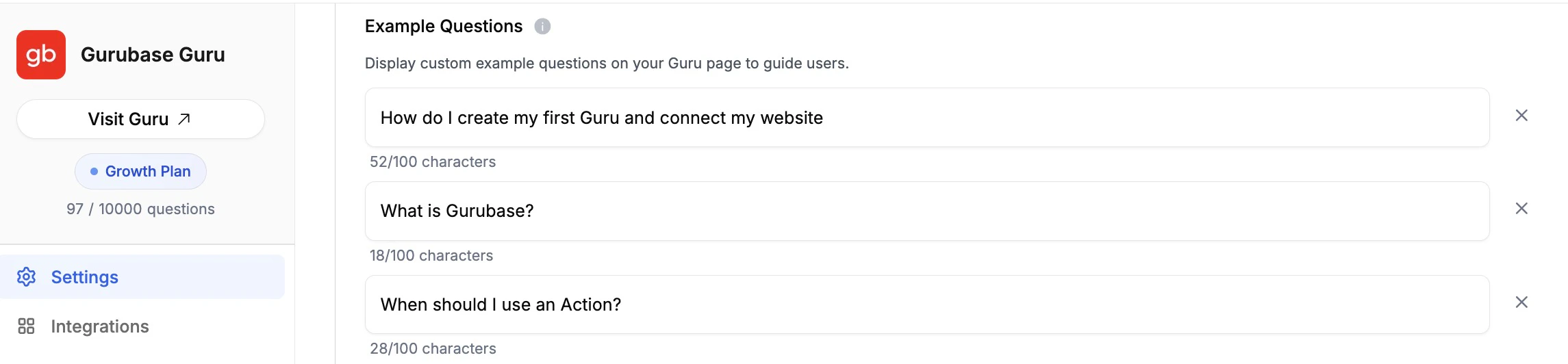 ### How to Add Example Questions
1. Navigate to your Guru's settings page (e.g., `https://app.gurubase.io/guru/[guru-slug]`)
2. Scroll down to the **Advanced Settings** section
3. Find the **Example Questions** section
4. Click **Add Example Question** to add a new question
5. Type your example question in the text field
6. Repeat for additional questions (up to 3 maximum)
7. Click **Update Guru** to save your changes
### Managing Example Questions
* **Edit**: Simply modify the text in any question field
* **Remove**: Click the **X** button next to any question to delete it
* **Character limit**: Each question can be up to 100 characters (a counter shows remaining characters)
## Where Example Questions Appear
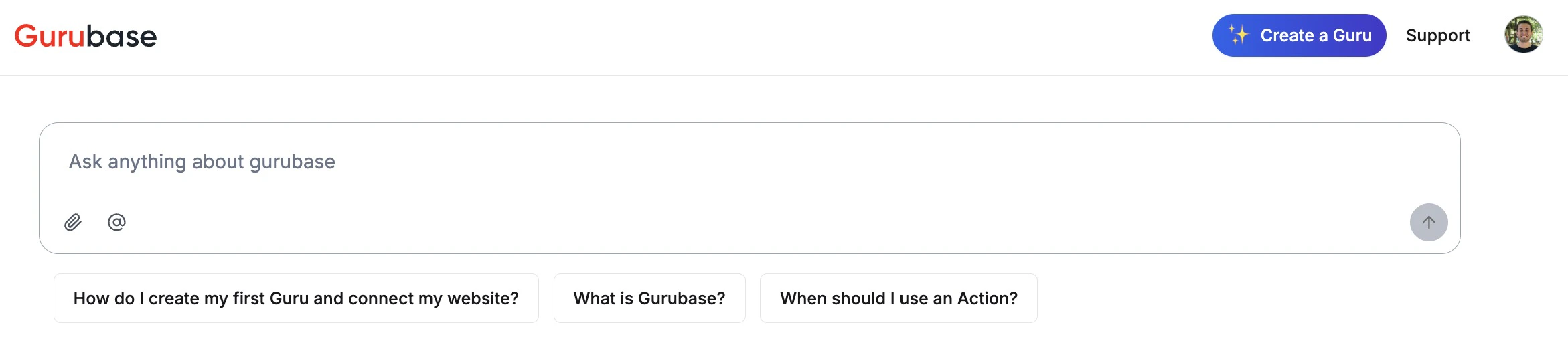
### Guru Main Page
Example questions are displayed below the search input on your Guru's public page (e.g., `https://app.gurubase.io/g/[guru-slug]`).
### How to Add Example Questions
1. Navigate to your Guru's settings page (e.g., `https://app.gurubase.io/guru/[guru-slug]`)
2. Scroll down to the **Advanced Settings** section
3. Find the **Example Questions** section
4. Click **Add Example Question** to add a new question
5. Type your example question in the text field
6. Repeat for additional questions (up to 3 maximum)
7. Click **Update Guru** to save your changes
### Managing Example Questions
* **Edit**: Simply modify the text in any question field
* **Remove**: Click the **X** button next to any question to delete it
* **Character limit**: Each question can be up to 100 characters (a counter shows remaining characters)
## Where Example Questions Appear
### Guru Main Page
Example questions are displayed below the search input on your Guru's public page (e.g., `https://app.gurubase.io/g/[guru-slug]`).
 ### Website Widget
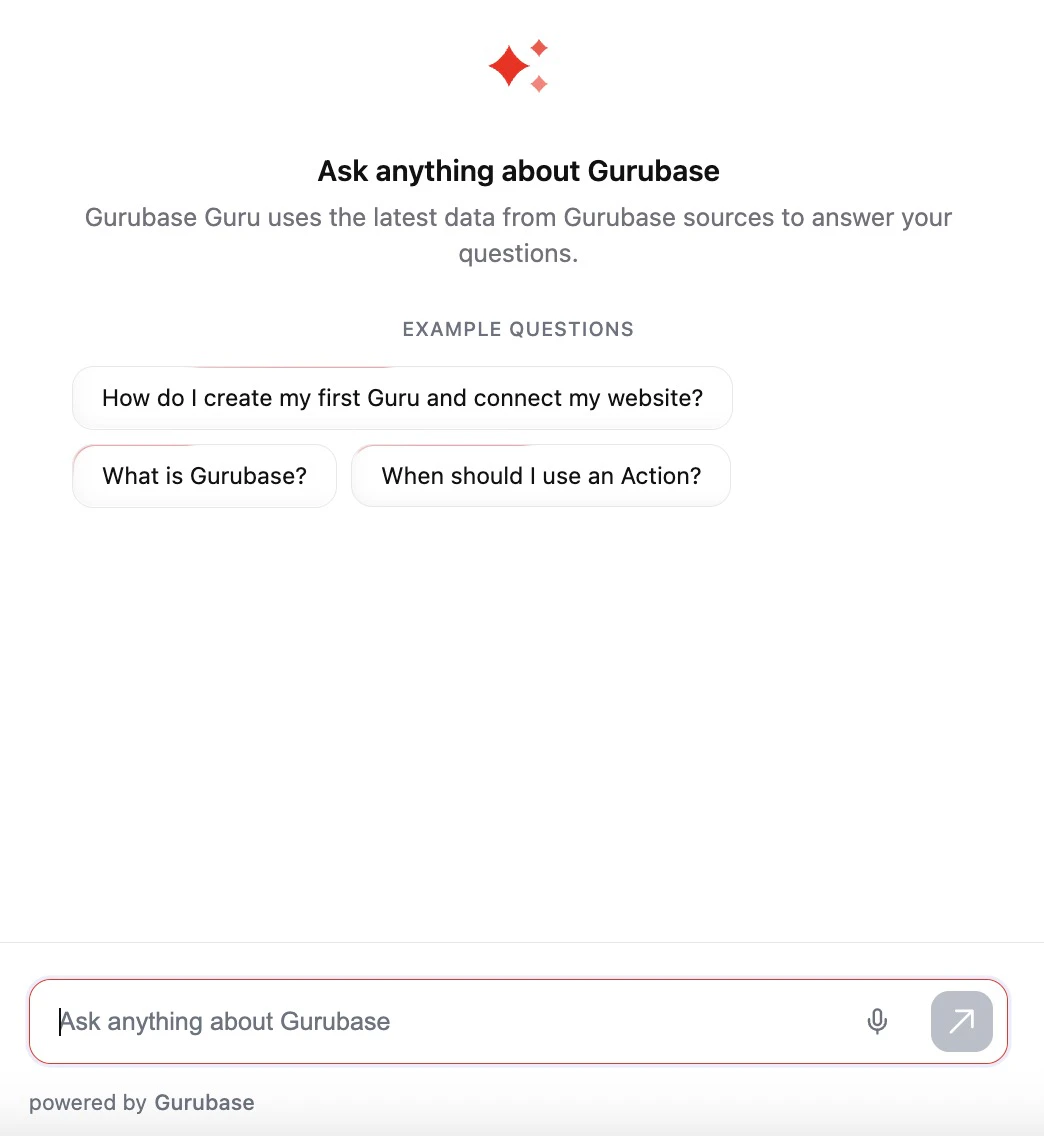
Example questions are included in the widget endpoint response and displayed to users interacting with your embedded widget. You can create a widget (Ask AI button) to your website using the [Website Widget](/integrations/bots/website-widget) integration.
### Website Widget
Example questions are included in the widget endpoint response and displayed to users interacting with your embedded widget. You can create a widget (Ask AI button) to your website using the [Website Widget](/integrations/bots/website-widget) integration.
 ## Best Practices
### Writing Effective Example Questions
Write questions that represent common use cases and demonstrate your Guru's expertise.
**Good examples:**
* "How do I integrate the widget into my website?"
* "What are the pricing plans available?"
* "How do I reset my password?"
**Keep in mind:**
* Use clear, natural language
* Focus on frequently asked questions
* Cover different aspects of your Guru's knowledge
* Keep questions concise (under 100 characters)
### Strategic Use Cases
1. **Product documentation**: "How do I get started with \[product]?"
2. **Technical support**: "How do I troubleshoot \[common issue]?"
3. **Sales enablement**: "What features are included in the Pro plan?"
4. **Onboarding**: "What can this Guru help me with?"
## Important Notes
Example questions are text-only suggestions. They are not linked to existing answered questions in the database, they serve purely as prompts to guide users.
* Example questions help set user expectations about your Guru's capabilities
* Consider updating them periodically based on analytics and user feedback
* Use the [Analytics](/guides/analytics) feature to identify popular topics and optimize your example questions
## Best Practices
### Writing Effective Example Questions
Write questions that represent common use cases and demonstrate your Guru's expertise.
**Good examples:**
* "How do I integrate the widget into my website?"
* "What are the pricing plans available?"
* "How do I reset my password?"
**Keep in mind:**
* Use clear, natural language
* Focus on frequently asked questions
* Cover different aspects of your Guru's knowledge
* Keep questions concise (under 100 characters)
### Strategic Use Cases
1. **Product documentation**: "How do I get started with \[product]?"
2. **Technical support**: "How do I troubleshoot \[common issue]?"
3. **Sales enablement**: "What features are included in the Pro plan?"
4. **Onboarding**: "What can this Guru help me with?"
## Important Notes
Example questions are text-only suggestions. They are not linked to existing answered questions in the database, they serve purely as prompts to guide users.
* Example questions help set user expectations about your Guru's capabilities
* Consider updating them periodically based on analytics and user feedback
* Use the [Analytics](/guides/analytics) feature to identify popular topics and optimize your example questions