> ## Documentation Index
> Fetch the complete documentation index at: https://docs.gurubase.ai/llms.txt
> Use this file to discover all available pages before exploring further.
# Excel Extraction Best Practices
> Learn how to prepare Excel files for optimal extraction and analysis
Gurubase can interpret various Excel structures, but proper formatting significantly improves extraction quality. Follow these guidelines for optimal results.
## Quick Reference
Include all column headers
Avoid complex nesting
Remove blank rows/columns
Split large datasets
Use tables, not forms
Keep files small
***
## Structure Guidelines
### 1. Complete Headers and Columns
Always include complete headers and columns for all data sections.
✅ **Good Example**
 ❌ **Bad Example**
 *Missing Price and Stock columns*
### 2. Use Clear Structures
Avoid complex nested structures and multi-tables when possible.
✅ **Good Example**
*Missing Price and Stock columns*
### 2. Use Clear Structures
Avoid complex nested structures and multi-tables when possible.
✅ **Good Example**
 ❌ **Bad Example**
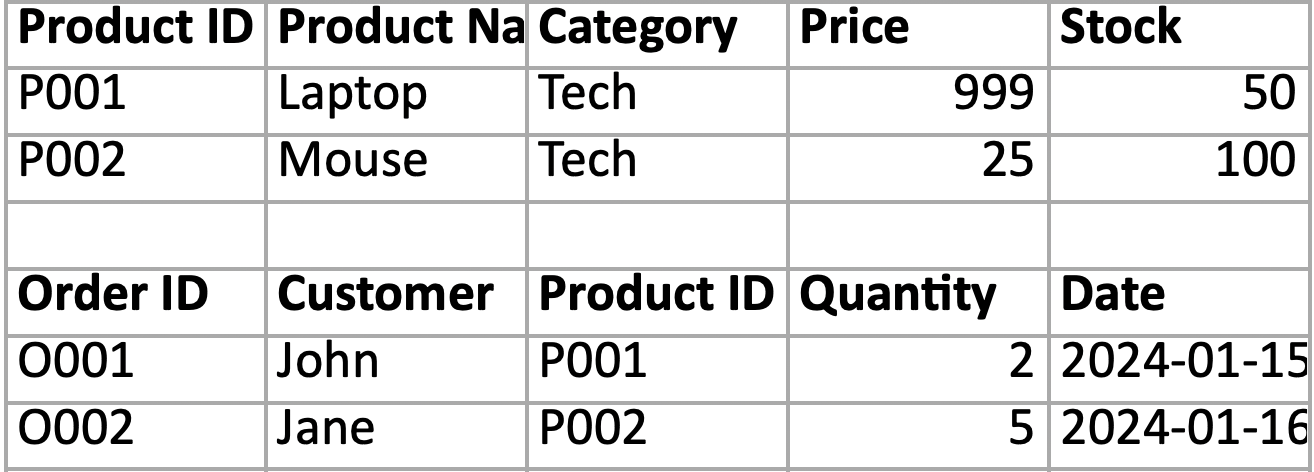
 **For Sub-tables**:
When you have sub-tables or multiple data sections, repeat headers and columns for each section:
**For Sub-tables**:
When you have sub-tables or multiple data sections, repeat headers and columns for each section:
 ### 3. Clean Empty Rows and Columns
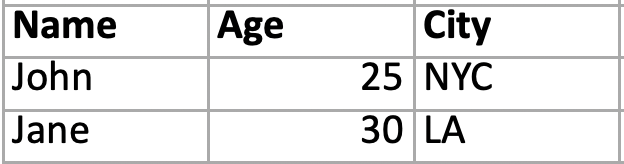
Remove all empty rows and columns to keep files as small as possible.
**Before Cleaning:**
### 3. Clean Empty Rows and Columns
Remove all empty rows and columns to keep files as small as possible.
**Before Cleaning:**
 **After Cleaning:**
 ### 4. Split into Smaller Sheets
Divide large datasets into multiple smaller, focused sheets.
| Sheet | Content |
| ------- | -------------------- |
| Sheet 1 | Customer Information |
| Sheet 2 | Product Catalog |
| Sheet 3 | Sales Transactions |
| Sheet 4 | Inventory Levels |
This improves processing speed, organization, and reduces file size.
### 5. Use Table Structure Over Form Structure
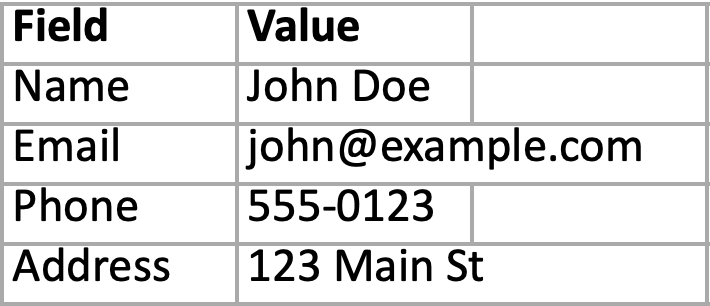
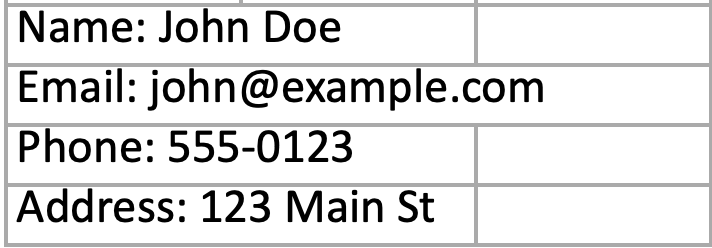
Prefer tabular data layout instead of form-based layouts.
✅ **Good Example (Table Structure)**
### 4. Split into Smaller Sheets
Divide large datasets into multiple smaller, focused sheets.
| Sheet | Content |
| ------- | -------------------- |
| Sheet 1 | Customer Information |
| Sheet 2 | Product Catalog |
| Sheet 3 | Sales Transactions |
| Sheet 4 | Inventory Levels |
This improves processing speed, organization, and reduces file size.
### 5. Use Table Structure Over Form Structure
Prefer tabular data layout instead of form-based layouts.
✅ **Good Example (Table Structure)**
 ❌ **Bad Example (Form Structure)**
 ***
## Advanced Formatting
### 6. Proper Nested Structure
When nesting is necessary, ensure flows completely encompass each other and merge headers around grouped content.
✅ **Good Example (Proper Nested Structure)**
***
## Advanced Formatting
### 6. Proper Nested Structure
When nesting is necessary, ensure flows completely encompass each other and merge headers around grouped content.
✅ **Good Example (Proper Nested Structure)**
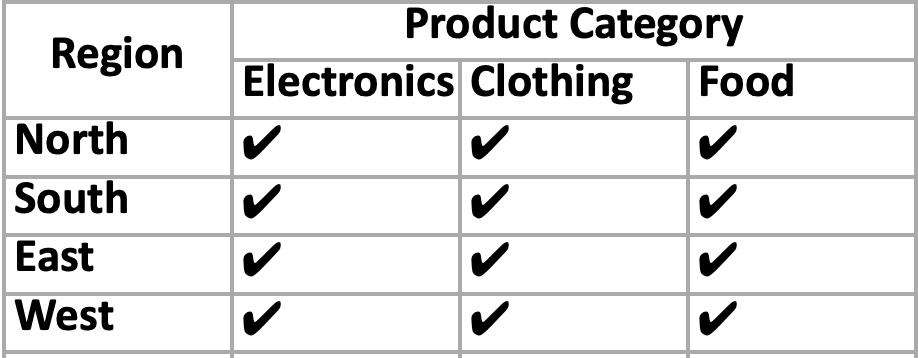 ✅ **Good Example (Proper Nested Structure)**
 ❌ **Bad Example**
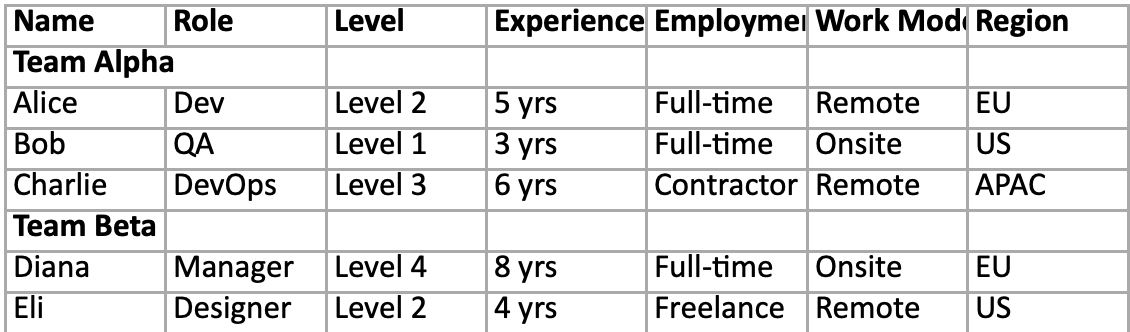 Here is its fixed version:
 **Key Principles for Nested Structures**
1. **Complete Coverage**: Each nested level should fully encompass the data below it
2. **Merged Headers**: Use merged cells to group related columns under main categories
3. **Consistent Structure**: Maintain the same pattern throughout the sheet
4. **Clear Hierarchy**: Make the relationship between levels obvious
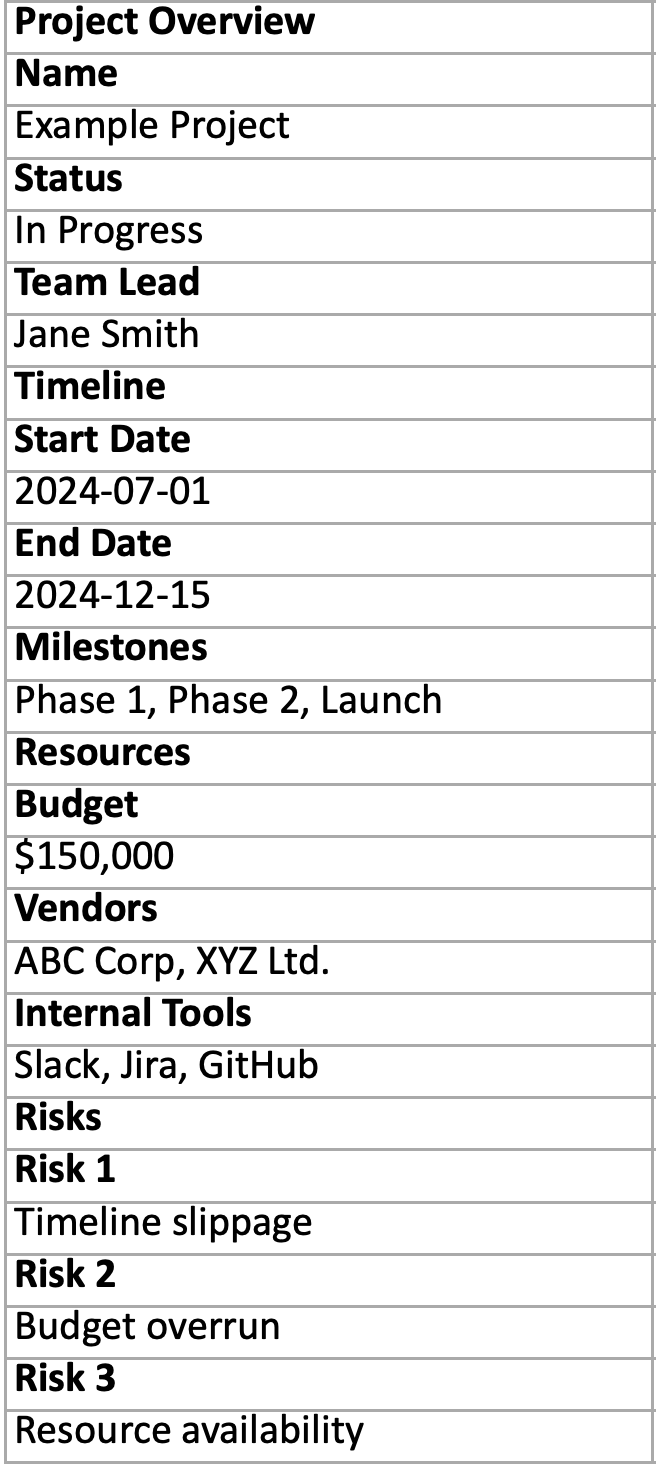
### 7. Column Oriented Tables
Gurubase can also handle column-oriented Excel files. Just make sure you include proper headers above the data cells:
✅ **Good Example (Proper Nested Structure)**
**Key Principles for Nested Structures**
1. **Complete Coverage**: Each nested level should fully encompass the data below it
2. **Merged Headers**: Use merged cells to group related columns under main categories
3. **Consistent Structure**: Maintain the same pattern throughout the sheet
4. **Clear Hierarchy**: Make the relationship between levels obvious
### 7. Column Oriented Tables
Gurubase can also handle column-oriented Excel files. Just make sure you include proper headers above the data cells:
✅ **Good Example (Proper Nested Structure)**
 ***
## Optimization
### 8. File Size Optimization
Keep files as small as possible for better performance:
| Action | Benefit |
| ----------------------------- | ------------------ |
| Remove unused worksheets | Reduces file size |
| Delete empty rows/columns | Faster processing |
| Use appropriate data types | Better accuracy |
| Compress images | Smaller uploads |
| Remove unnecessary formatting | Cleaner extraction |
### 9. Common Mistakes to Avoid
* **Missing headers** - Always include column headers
* **Unclear header hierarchy** - Make nested header relationships obvious
* **Inconsistent header spanning** - Use merged cells consistently for grouped columns
* **Excessive nesting** - Prefer flat structures when possible
* **Mixed data types** - Keep consistent formats within columns
* **Hidden data** - Ensure all relevant data is visible
* **Ambiguous header names** - Use descriptive, specific header labels
* **Large single sheets** - Split into multiple focused sheets
* **Unnecessary formatting** - Remove complex styling
* **Inconsistent naming** - Use clear, consistent naming conventions
***
## Next Steps
Learn about all supported data sources
Build your AI assistant
***
## Optimization
### 8. File Size Optimization
Keep files as small as possible for better performance:
| Action | Benefit |
| ----------------------------- | ------------------ |
| Remove unused worksheets | Reduces file size |
| Delete empty rows/columns | Faster processing |
| Use appropriate data types | Better accuracy |
| Compress images | Smaller uploads |
| Remove unnecessary formatting | Cleaner extraction |
### 9. Common Mistakes to Avoid
* **Missing headers** - Always include column headers
* **Unclear header hierarchy** - Make nested header relationships obvious
* **Inconsistent header spanning** - Use merged cells consistently for grouped columns
* **Excessive nesting** - Prefer flat structures when possible
* **Mixed data types** - Keep consistent formats within columns
* **Hidden data** - Ensure all relevant data is visible
* **Ambiguous header names** - Use descriptive, specific header labels
* **Large single sheets** - Split into multiple focused sheets
* **Unnecessary formatting** - Remove complex styling
* **Inconsistent naming** - Use clear, consistent naming conventions
***
## Next Steps
Learn about all supported data sources
Build your AI assistant