

At a Glance
Website
Crawl, sitemap import, or sync job
Documents & manuals
Word
Policies & reports
Excel
Spreadsheets & data

GitHub
Repositories & code

YouTube
Video transcripts
Text
Custom snippets

Zendesk
Tickets & articles

Confluence
Wiki & docs

Jira
Issues & projects

Slack
Conversations

Google Drive
Docs & files
Salesforce
Knowledge base
Reserved Labels
Some labels have special behavior in Gurubase. Manual labels can be added by you to any applicable data source. Auto labels are assigned automatically by the platform and cannot be set manually.Custom labels (e.g.,
faq, onboarding) can be added freely alongside reserved labels for your own organization and filtering needs.Access Control
Every data source has a Visible to field that controls which users can see its content when they ask a question. When Visible to is empty, the source is marked Everyone and every authenticated user of the guru can retrieve context from it. When Visible to lists one or more groups, only users with membership in at least one of those groups can see the source. Everyone and specific groups are mutually exclusive. Selecting any group automatically clears Everyone, and selecting Everyone clears any previously selected groups. This prevents accidental exposure when switching between the two modes.Access control applies only to authenticated users on the Gurubase Next.js UI. The
widget embed, public
/api/v1/answer/ endpoint, Slack, Discord, GitHub, Jira,
Zendesk, MCP server, and chat-completions endpoints currently return Everyone-only
results. Group-based access control for these surfaces is scheduled for v5.1+.For setup instructions and a worked example, see Groups & Content Access Control.
File-Based Sources
PDF Documents
Upload PDF files to index text and images. Perfect for documentation, research papers, and manuals.Word Documents
Upload Word documents (.docx) to index text and image content. Ideal for policies, reports, and formatted documents.Excel Files
Upload spreadsheets (.xls, .xlsx) to index tabular data with header relationships.Excel Extraction Best Practices
Learn how to prepare Excel files for optimal extraction
Custom Text
Add custom text directly for FAQs, instructions, or any content that doesn’t fit other categories.Web Sources
Website Indexing
Index entire websites or specific pages. Gurubase extracts text, headings, and structured content.
Images from websites are also indexed (plan feature).
Sitemap Sync Job
A Sitemap Sync Job automatically keeps your knowledge base in sync with your website. On each run it:- Adds new URLs found in the sitemap
- Updates pages whose content has changed (by comparing fresh content against stored content)
- Removes pages that are no longer in the sitemap
- Retries URLs that failed on the previous run
- Navigate to your Guru’s settings page
- Click Add Websites and select Sitemap Job
- Provide a sitemap URL (e.g.,
https://example.com/sitemap.xml) - Set a sync interval between 6 and 24 hours (default: 12 hours)
- Optionally configure URL filtering with include/exclude patterns
The sitemap is the source of truth. URLs not present in the sitemap will be removed from your knowledge base. If the sitemap is unreachable, no changes are made and all existing data is preserved.
URL Filtering (fnmatch Patterns)
Sitemap Sync Jobs support include and exclude pattern lists to control which URLs are indexed. Patterns use Python’sfnmatch syntax where * matches everything (including /), ? matches a single character, and [seq] matches any character in the sequence.
- Include patterns: Only URLs matching at least one pattern are indexed. Leave empty to include all URLs.
- Exclude patterns: URLs matching any pattern are skipped, regardless of include patterns. Excludes are evaluated first.
You can combine multiple include and exclude patterns for precise control.
Crawl Options
Skipped Paths: The crawler automatically skips non-content paths like
/feed/, /rss/, /static/, /assets/, /media/, /wp-admin/, /wp-json/, /_static/, /_sources/, and common file extensions (images, PDFs, CSS, JS, etc.).YouTube Videos
Import video transcripts and metadata from YouTube channels, playlists, or individual videos.Code Repositories
GitHub
Index repositories to make code, documentation, and README files searchable. Supports public and private repositories.
Token Requirements:
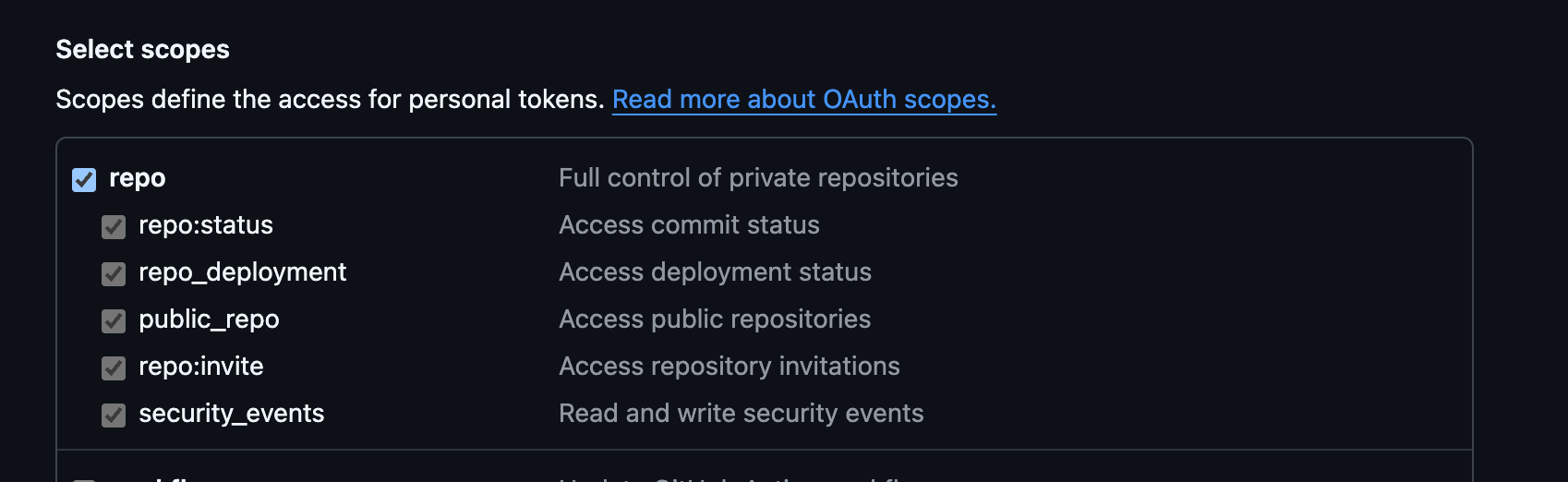
Classic Token Setup
Classic Token Setup
- Go to GitHub Tokens (classic) (GitHub Settings → Developer settings → Personal access tokens → Tokens (classic))
- Click Generate new token (classic)
- Under Select scopes, check the repo checkbox (this grants full control of private repositories)
Fine-grained Token Setup
Fine-grained Token Setup
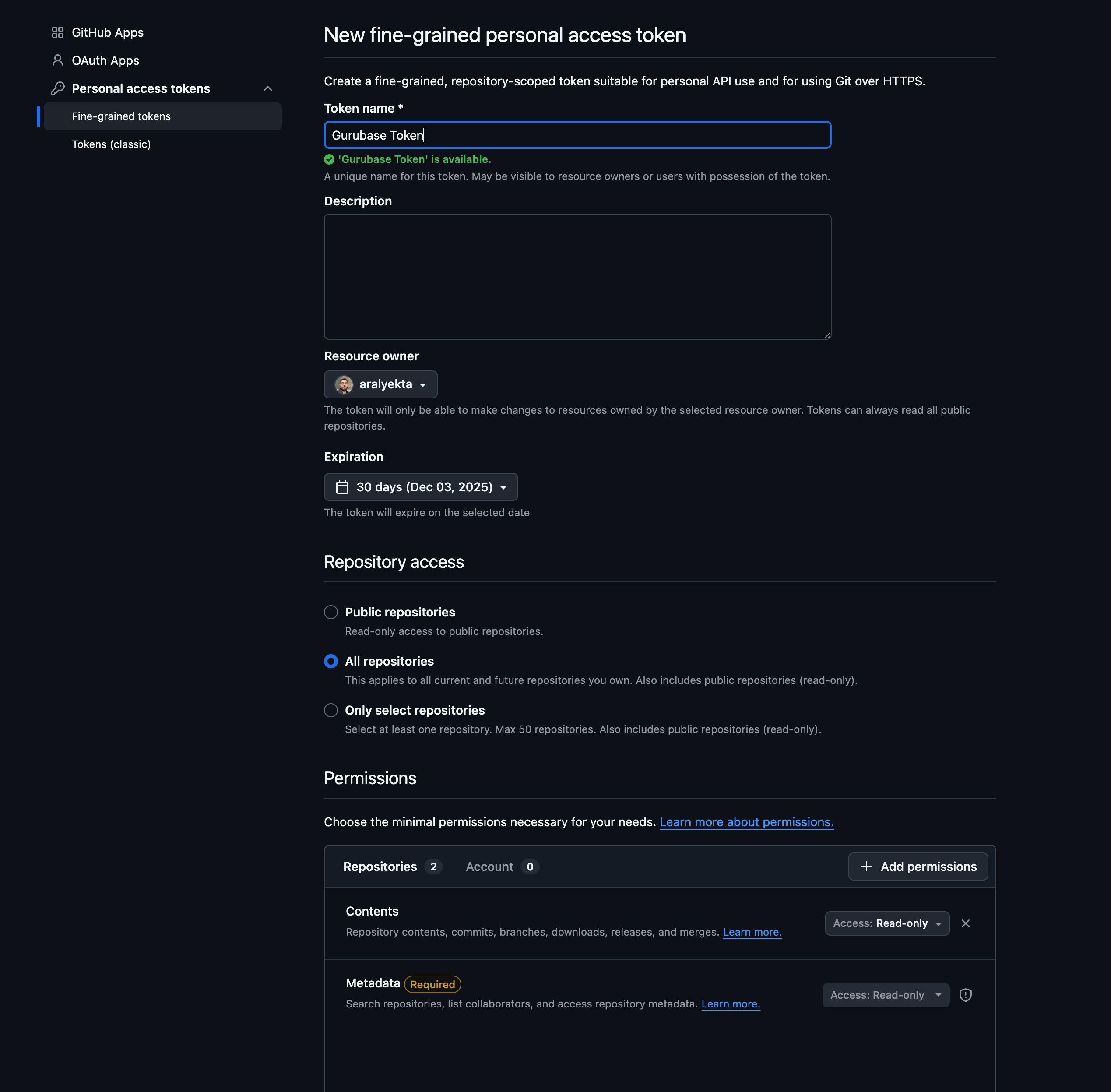
- Go to GitHub Fine-grained tokens (GitHub Settings → Developer settings → Personal access tokens → Fine-grained tokens)
- Click Generate new token
- Enter a Token name (e.g., “Gurubase Token”)
- Set Expiration as needed
- Under Repository access, select one of:
- All repositories - Access all current and future repositories
- Only select repositories - Choose specific repositories (max 50)
- Under Permissions → Repository permissions, add:
- Contents: Read-only
- Metadata: Read-only (required)
! exclude. Blank lines and lines starting with # are
ignored.
Mixing includes and excludes — combine them by writing one per line:
docs/ except CHANGELOG_LEGACY.md.
Patterns support recursive globstar (**), brace expansion ({a,b}), extglob
(!(...), @(...), +(...), *(...), ?(...)), and gitignore-style
negation via leading ! on its own line.
Test your patterns with globster.xyz before adding.
Platform Integrations
Platform integrations provide automated syncing and deeper integration with enterprise tools.Zendesk
Index support tickets and help center articles. Set up backfill jobs for automated syncing.Zendesk Integration
Import tickets, articles, comments, and attachments
Confluence
Index Atlassian Confluence spaces and pages. Supports CQL queries for advanced filtering.Confluence Integration
Sync team documentation and wiki pages
Jira
Index project issues, tickets, and related documentation.Jira Integration
Import issues and project data
Slack
Index Slack conversations and threads. Configure trusted users for targeted content.Slack Integration
Capture team knowledge from conversations
Google Drive
Connect Google Drive to index documents, spreadsheets, and files.Google Drive Integration
Sync Google Docs, Sheets, and files
Salesforce
Index Salesforce Knowledge Base articles. Supports SOQL queries for filtering.Salesforce Integration
Import knowledge base articles
Managing Sources in Bulk
The Sources table supports multi-select checkboxes so you can act on many sources at once instead of row by row. Tick the sources you want, then use the bulk action bar to:- Reindex every selected source in one step.
- Delete every selected source.
- Assign labels to the selection. The entered labels replace each source’s current labels; protected labels such as
google_driveare preserved automatically.
Reindexing Sources
Reindexing refreshes what your Guru has stored for a source. Behavior depends on the source type:
Reindex is available from each row’s action menu and from the bulk action bar.
Best Practices
Content Organization
Content Organization
- Mix source types - Combine documents, websites, and integrations for comprehensive coverage
- Use labels - Organize text sources with labels (e.g.,
playbooks,faq) - Platform integrations - Use for content that changes frequently
Data Quality
Data Quality
- Review indexed content - Check what’s actually indexed in your Guru’s sources
- Use filtering - Glob patterns for GitHub, CQL for Confluence, SOQL for Salesforce
- Test your Guru - Ask sample questions to verify content quality
Keeping Content Fresh
Keeping Content Fresh
- Backfill jobs - Set up automated syncing for Zendesk, Confluence, Jira, Slack
- Sitemap Sync Jobs - Automatically keep website content in sync with your sitemap
- Reindex regularly - Reindex file, text, website, YouTube, and GitHub sources from the Sources table; use bulk selection to reindex many at once
- Monitor status - Check integration status in your Guru’s settings
Next Steps
Create Your First Guru
Step-by-step guide to building your AI assistant
Deploy a Widget
Embed your Guru on your website