

Source Visibility Rules
Source visibility rules let you hide a data source type from specific question channels. Use them when content is appropriate for one audience but should not surface in another. For example, exclude internal Zendesk tickets from your public website widget while still using Zendesk articles for it. Rules are configured per Guru, take effect immediately at retrieval time, and require no reindexing.How It Works
When a question arrives, Gurubase computes the set of data sources eligible for context retrieval. For every rule that includes the question’s channel, all data sources of the matching type are removed from that set before the vector search runs.- The default state is fully checked: every data source type is visible to every channel. Unchecking a cell adds an exclusion.
- Zendesk supports a per-subtype rule: tickets and articles can be excluded independently.
- Removing a source from retrieval does not delete or unindex it; it only hides it from the listed channels.
- Sources labeled
mandatoryhonor these rules too: excluding a type hides every source of that type, mandatory or not. The editor surfaces an inline warning (“N mandatory”) on rows where an active exclusion will hide mandatory-labeled sources.
Configuration
Open your Guru and go to Edit Guru → Advanced Settings → Source Visibility Rules.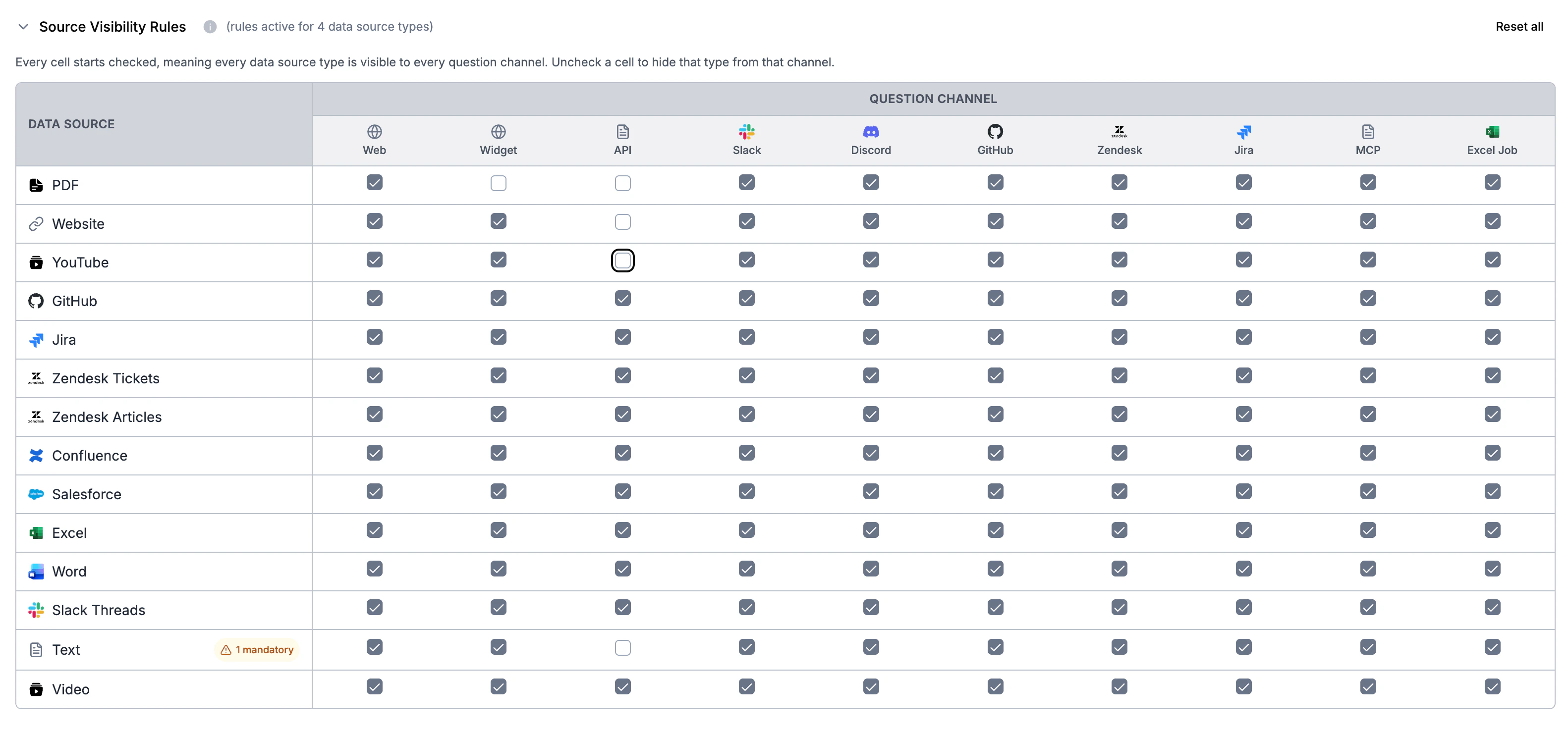
- Rows are data source types: PDF, Website, YouTube, GitHub, Jira, Zendesk Tickets, Zendesk Articles, Confluence, Salesforce, Excel, Word, Slack Threads, Text, Video.
- Columns are question channels: Web, Widget, API, Slack, Discord, GitHub, Zendesk, Jira, MCP, Excel Job.
Examples
- Hide website pages from the widget: uncheck the cell at row Website, column Widget.
- Hide Zendesk tickets from the widget but keep articles: uncheck Zendesk Tickets x Widget, leave Zendesk Articles x Widget checked.
- Restrict GitHub Issues bot to repository sources only: uncheck every row except GitHub under the GitHub column.
Notes
- Rules apply to context retrieval. Question-time inputs that are passed in with the question itself (uploaded files, image descriptions, action results) bypass retrieval and are not filtered.
- Rules are versioned with the rest of your Guru configuration in version history.
- Visibility rules compose with content group restrictions: a source must satisfy both to be retrieved.